Nov 13, 2025
Productivity
Your Guide to Sales Call Recording Software in 2026

Sales call recording software is a tool that captures audio and video from every sales conversation, turning them into a goldmine of searchable, analyzable data. But it's way more than just a playback button. Today's platforms use AI to transcribe calls, whip up summaries, and pinpoint key insights that help your team close more deals and sharpen their skills.
What Is Sales Call Recording Software, Really?
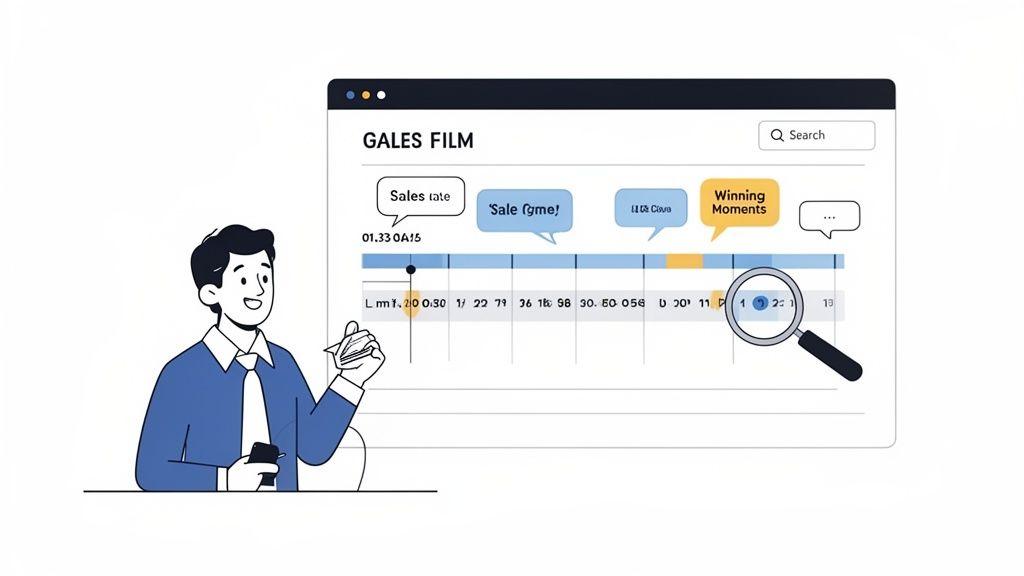
Think of every sales call like game film. Pro sports teams don't just play the game—they record it, study every play, and break it all down to find out what works and what doesn’t. That’s exactly what sales call recording software does for your revenue team.
It takes you far beyond simple audio clips. Every conversation, whether it’s a quick phone call or a full-blown video demo, is transformed into a strategic asset. All those spoken words become a searchable database packed with customer feedback, objections, competitor mentions, and subtle buying signals you’d otherwise miss.
From Simple Recording to Strategic Intelligence
Not long ago, recording a call was mostly for CYA compliance or jogging a rep's memory. A salesperson might listen back to a call to remember one specific detail. A manager might do a random spot-check. It was a manual, time-consuming grind with very little strategic payoff.
But today's platforms are a different breed. They've evolved into intelligent systems that act like a coach on the sidelines, analyzing the game as it happens and dishing out actionable insights. This shift has turned a once-passive tool into a core part of the modern sales engine. Instead of just hearing what was said, you can now understand it at scale.
This evolution is why the market is absolutely exploding. The global call recording software market is set to skyrocket from USD 4.28 billion in 2024 to USD 9.36 billion by 2031. This incredible growth, highlighted in research from Data Insights Reports, shows just how vital these tools have become. Cloud-based solutions are leading the pack, offering the flexibility and scale that modern businesses need.
Why It's No Longer a Luxury
In a cutthroat market, relying on memory and sloppy notes is like trying to win a championship without ever watching the game film. Your top performers have their winning moves, but those skills stay locked away in their individual calls. Meanwhile, the same common objections are tanking deals across the entire team, and nobody even knows it.
Sales call recording software completely flips that script by creating a hive mind.
By capturing and analyzing every interaction, you create a living library of what works and what doesn't. This turns gut feelings into data-backed strategy, giving every single person on your team access to the insights previously held by only a few.
This technology becomes the single source of truth, benefiting everyone:
For Sales Reps: It’s an automatic note-taker, freeing them to actually listen and be present in conversations. They can easily pull up key details for a killer follow-up without digging through old notes.
For Sales Managers: It enables targeted, data-driven coaching without needing to shadow every single call. You can finally scale your ability to level up the entire team.
For Founders: It offers a direct, unfiltered line to the voice of the customer. You hear exactly what people think about your product, pricing, and positioning.
For Customer Success: It ensures a buttery-smooth handoff from sales. The CS team gets the full backstory on every promise made and every pain point discussed.
Ultimately, this software is about turning messy, unstructured conversations into clean, structured, and actionable data. It's the foundation for improving your sales process, onboarding new reps faster, and making forecasts that are actually accurate—making it a non-negotiable for any company serious about growth.
Core Features That Turn Conversations Into Revenue
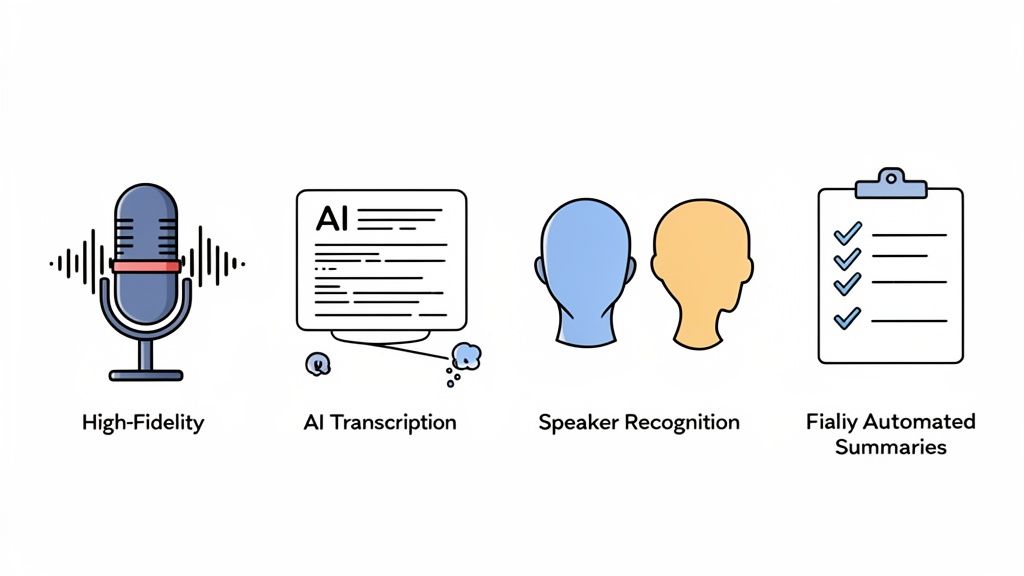
Let's be clear: modern sales call recording software isn't just a glorified tape recorder. The best platforms have evolved into intelligent engines that actively help you turn everyday conversations into real, measurable revenue. These aren't just flashy add-ons; they are strategic tools built to obliterate admin work, uncover mission-critical insights, and give your sales reps their most valuable asset back: time to actually sell.
Think of it like having a hyper-efficient pit crew for your sales team. Each feature has a specific job, but they all work together in perfect sync to make sure every single call is optimized for peak performance. So, let’s break down the core capabilities that elevate your call recordings from a dusty digital archive into an active, revenue-generating machine.
High-Fidelity Call and Video Recording
It all starts here. The absolute foundation of any good system is crystal-clear recording. Whether it’s a quick phone call or a full-blown video conference, capturing every word with high fidelity is non-negotiable.
If the audio is garbage, everything else falls apart. You get missed details, sloppy transcriptions, and flawed analysis, making all the other fancy features totally useless. Top-tier software ensures every interaction is captured perfectly across every platform you use—from VoIP and Zoom to Google Meet. This gives you a reliable source of truth for every promise made and every question asked.
AI-Powered Transcription
Once the call is recorded, the real work begins: making it useful. AI-powered transcription is the first step, automatically converting all that audio into a searchable text document, usually just minutes after the call ends. This feature alone is a massive productivity unlock.
No more manually scrubbing through a 60-minute recording just to find that one time a competitor was mentioned. A rep can now just type in the keyword and jump directly to that exact moment in the conversation.
This capability single-handedly claws back hours of wasted time. It transforms a dense, inaccessible audio file into a scannable, searchable document, finally unlocking the priceless data trapped inside.
This is where the magic really starts. An account executive prepping for a follow-up can instantly find the precise moment a prospect mentioned a specific budget constraint or a technical hurdle, letting them craft a perfectly targeted response. You can get a closer look at how GLINKY works to see this in practice.
Native Speaker Recognition
An accurate transcript is only as good as its ability to tell you who said what. This is where native speaker recognition comes in. The most advanced platforms can identify each speaker in the conversation without needing a clunky, intrusive "bot" to join the call and announce itself.
This creates a far more natural and professional experience for your prospects and clients. More importantly, it provides critical context. Knowing the customer brought up a competitor is a completely different ballgame than the sales rep mentioning them first. Accurate speaker diarization ensures that all the summaries, action items, and coaching insights are attributed to the right person, which leads to far more reliable analysis.
Automated Summaries and Action Items
If there's one feature that has the most immediate impact on daily productivity, it's this one. After a meeting, the software's AI gets to work, analyzing the transcript to generate a concise summary, pull out key decisions, and flag any next steps or action items.
This is an absolute game-changer for sales efficiency. Your reps can immediately pivot to their next call while the software is already drafting a follow-up email and logging the action items in the CRM. It’s a huge reason why the software component of this market is projected to command 60.04% of the market share in 2025.
Teams are demanding this kind of intelligence. By using tools like conversational intelligence, platforms can do more than just listen; they can understand intent and context, turning raw conversation into strategic gold.
Essential vs. Advanced Features in Call Recording Software
Not all features are created equal. When you're evaluating software, it helps to think in terms of "must-haves" versus "game-changers." The essentials are the table stakes—the foundational features you can't live without. The advanced capabilities are where you find your competitive edge.
Here’s a quick breakdown:
Feature Category | Essential Capability (The 'Must-Haves') | Advanced Capability (The 'Game-Changers') |
|---|---|---|
Recording | High-fidelity audio and video capture across multiple platforms (VoIP, Zoom, etc.). | Bot-free native recording that captures calls without an intrusive bot joining the meeting. |
Transcription | Basic AI-powered transcription of the entire conversation. | Real-time transcription with high accuracy and speaker labels (diarization). |
Analysis | Keyword searching within transcripts. | AI-driven topic and sentiment analysis; automatic flagging of key moments (competitor mentions, objections). |
Post-Call Workflow | Manual note-taking and summary writing. | Automated AI summaries, action items, and decision logs generated instantly post-call. |
CRM Integration | Basic ability to link a recording to a contact or deal record. | Intelligent, deep CRM updates that automatically populate specific fields based on conversation content. |
While the "must-haves" will definitely improve your team's workflow, it's the "game-changers" that truly transform your operations. These advanced, AI-driven features are what separate a simple recording tool from a genuine revenue intelligence platform.
Navigating Call Recording Compliance and Security
Adopting sales call recording software gives you immense power, but it also hands you a serious responsibility to protect your business and your customers. Getting compliance and security right isn't just about ticking a legal box—it’s the very foundation of customer trust. One wrong move can lead to heavy fines, a damaged reputation, and lost deals.
Think of your call recordings as a vault filled with sensitive customer data. You wouldn't leave a physical vault unlocked, and you certainly can't afford to be careless with your digital one. While the legal landscape around call recording can seem complex, the core principles are actually quite straightforward and absolutely essential to master.
Understanding Consent Laws: One-Party vs. Two-Party
The most critical legal concept you need to nail down is consent. The rules for recording calls change dramatically depending on where your participants are located. Generally, these regulations fall into two buckets:
One-Party Consent: In these places, you only need consent from one person on the call to legally record it. Since your own sales rep is part of your company and implicitly agrees to be recorded, you're typically covered. A lot of U.S. states follow this rule.
Two-Party Consent (or All-Party): This is the stricter—and frankly, safer—standard to live by. In these regions, you have to get consent from everyone on the call before you hit record. States like California, Florida, and Pennsylvania, along with international regulations like GDPR in Europe, all demand this explicit permission.
Given that business is global, the universal best practice is simple: always assume two-party consent is required. This approach not only keeps you safe from accidentally breaking the law but also shows your customers you’re transparent and respect their privacy.
Key Security Features to Demand
Beyond just getting legal consent, the security of your recorded data is paramount. A breach could expose private customer details and your own strategic business info, leading to truly disastrous outcomes. Any call recording software you consider must have robust, built-in security.
Failing to prioritize security is a massive unforced error. In an era where data privacy is a top customer concern, strong security protocols are not a feature—they are a prerequisite for doing business ethically and safely.
Look for these non-negotiable security features:
Secure Cloud Storage with End-to-End Encryption: Your data has to be encrypted both while it's being transferred (in transit) and while it's sitting on a server (at rest). This scrambles the data, making it completely unreadable to anyone who might gain unauthorized access.
Role-Based Access Controls (RBAC): Not everyone on your team needs to listen to every single call. RBAC lets you set specific permissions, ensuring reps can only see their own calls while managers can review their team's, and so on. It’s a simple way to limit exposure.
Automated Consent Announcements: The best platforms can automatically play a brief, pre-recorded message at the start of each call, like, "This call will be recorded for quality and training purposes." This automates your compliance and removes the risk of someone forgetting.
For a deeper dive into how a provider handles your data, you should always be able to review their documentation. You can learn more about how GLINKY approaches data protection by reviewing our privacy policy. By building a compliant and secure recording process from day one, you can confidently use these powerful tools to grow your business without putting it at risk.
Integrating Call Intelligence Across Your Tech Stack
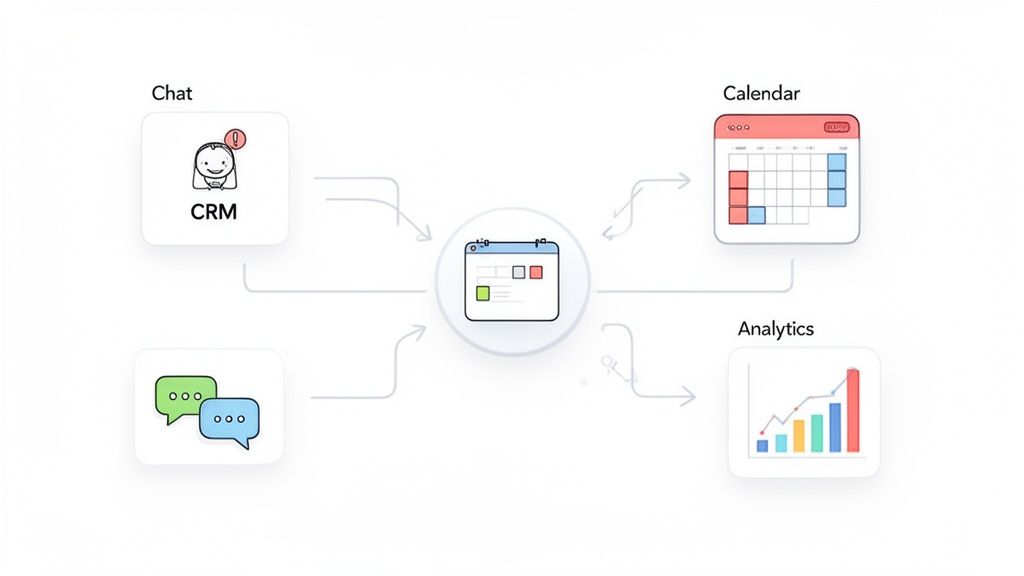
A sales call recording software that stands alone isn't just limited—it’s a liability. It traps invaluable customer intelligence on a digital island, forcing your reps to waste hours manually copying and pasting notes, action items, and deal updates between systems. That’s a recipe for burnout and missed opportunities.
The real magic happens when your call intelligence platform connects seamlessly with the tools your team already lives in. Think of your tech stack as your company's central nervous system. The recording software acts as the ears, capturing every crucial detail. Integrations are the nerves, instantly relaying that information to the brain (your CRM) and the hands (your calendar and chat apps). This creates a single source of truth for every customer interaction, eliminating silos and forgotten follow-ups.
Linking Calls Directly to Your CRM
Your most critical connection will always be to your Customer Relationship Management (CRM) platform, like Salesforce or HubSpot. This integration is what elevates a call recording tool from a simple archive into an active, intelligent partner in your sales process.
When properly connected, the software automatically pushes every recording, transcript, and AI-generated summary directly to the right contact, deal, or account in your CRM. No more "I'll update the CRM later." It's done. This gives reps a complete, searchable history of every conversation right where they work, making handoffs and follow-ups ridiculously smooth.
This level of connectivity is driving a massive market shift. Sales teams are adopting interconnected tools at an incredible rate, with the sales software market projected to more than double from USD 35.9 billion in 2026 to USD 71.83 billion by 2031. While CRMs are the giants, conversational intelligence tools are exploding in popularity precisely because they embed these powerful insights directly into daily workflows. You can dig into these trends and see how this synergy helps reps turn recordings into revenue in this detailed industry report.
Connecting Insights to Your Calendar and Communication Tools
Beyond the CRM, connecting your call intelligence to calendars and team chat platforms like Slack closes the productivity loop. This is how you ensure insights don't just get logged and forgotten—they get shared, discussed, and acted upon immediately.
Integrating with your calendar and communication tools turns post-call workflows from a manual chore into an automated, background process. It means less admin time for reps and more visibility for the entire team.
Key integrations to look for include:
Calendar Integration (Google & Outlook): By linking to your calendar, the software can automatically attach meeting summaries and action items to the event itself. This makes it incredibly easy for anyone who was invited to find the key takeaways without having to dig through their inbox or ask for notes.
Communication Integration (Slack): This is for real-time collaboration. Did a prospect bring up a tricky objection? Instantly share that audio clip to a sales channel to brainstorm the perfect response. Did a rep absolutely nail the value prop? Share it as a best-practice example for coaching new hires.
Impact of Key Software Integrations
Connecting these systems creates a powerful feedback loop where each tool makes the others more valuable. It breaks down the walls between sales, customer success, and marketing, ensuring everyone is operating from the same up-to-date playbook.
Integration Type | Primary Benefit | Example Use Case |
|---|---|---|
CRM (e.g., Salesforce) | Creates a single source of truth for all customer interactions. | An AI summary and action items from a demo call are automatically logged under the deal record, giving the account manager full context for the next follow-up. |
Calendar (e.g., Google Calendar) | Links meeting outcomes directly to the scheduled event for easy access. | A project manager can click on a past calendar event and immediately find the AI-generated list of decisions and next steps from that kickoff meeting. |
Communication (e.g., Slack) | Enables instant collaboration and real-time coaching moments. | A sales manager spots a new competitor mention in a call and instantly shares the 30-second audio clip to the team’s Slack channel to develop a strategy. |
By weaving sales call recording software into the fabric of your tech stack, you move beyond just capturing calls. You build an intelligent, connected ecosystem that automates busywork, accelerates collaboration, and puts powerful customer insights right at your team’s fingertips.
How to Measure the ROI of Your Call Recording Software
Investing in new tech is always a business decision, and sales call recording software is no different. Sure, the productivity gains seem obvious, but the question your leadership team will really ask is: "What’s the financial return?" To get their buy-in, you have to talk about more than just features. You need a rock-solid business case that ties the software directly to your bottom line.
Measuring the return on investment (ROI) isn't about fuzzy math or guesswork. It's about tracking specific, tangible key performance indicators (KPIs). By zeroing in on core sales and operational metrics, you can draw a straight line from call intelligence to cold, hard cash.
Faster Onboarding and Reduced Ramp Time
One of the first and most powerful places you’ll see a return is with new hires. Traditionally, getting a new sales rep fully ramped up can take months. They shadow calls, try to absorb tribal knowledge, and slowly find their footing. That entire ramp-up period is a direct cost to the business—in salary, training resources, and lost sales opportunities.
With call recording software, you can create a curated library of "game films." Think of it as a highlight reel: the best demo calls, brilliant objection-handling moments, and perfect closing techniques from your A-players. New reps can binge-watch real-world examples from day one, slashing their learning curve.
Imagine reducing new hire ramp time by 20%. For a sales rep with a $100,000 annual on-target earnings, a three-month ramp period costs $25,000 in salary before they're fully productive. A 20% reduction saves $5,000 per hire, a figure that multiplies fast as you scale the team.
Boosting Quota Attainment and Shortening Sales Cycles
It's simple: more effective reps close more deals, faster. Call intelligence gives them the toolkit for continuous improvement. By digging into call data, managers can finally spot the patterns in winning conversations and coach the rest of the team on what actually works.
This data-driven coaching fuels direct improvements in two of the most critical sales metrics:
Increased Quota Attainment: Top-performing teams are obsessed with using conversation intelligence to refine their process. By replicating the talk tracks and strategies of your best reps, you can lift the performance of your entire team. The result? A much higher percentage of reps hitting or crushing their quota.
Shorter Sales Cycles: When reps can instantly pinpoint customer pain points, neutralize objections, and articulate value with precision, deals just move faster. A shorter sales cycle means recognizing revenue sooner and frees up your reps to work more opportunities each quarter.
To truly get a handle on the ROI of your call recording software, you have to think about the value you get from features like transcription. Diving into resources like this guide on understanding the ROI of transcription, even though it's about podcasts, can give you some great transferable insights.
Improving Forecast Accuracy and Customer Success
The impact goes far beyond just closing deals. Call intelligence shines a bright light on your pipeline's health and boosts long-term customer value. This is where you start to see the software’s true strategic power.
Better Forecast Accuracy: Gut feelings don't fly in board meetings. Reliable forecasts are built on data, not hope. Call recording software gives sales leaders an unfiltered view into deal health. By tracking competitor mentions, budget discussions, and stakeholder sentiment across calls, you can predict with much greater accuracy which deals are on track and which are about to go sideways. That leads to revenue projections you can actually depend on.
Enhanced Customer Success: The insights don't just vanish once a deal is signed. Customer Success teams can dive into the sales conversations to understand exactly what was promised and what the customer's real goals are. This makes for a seamless handoff, leading to happier customers, less churn, and more opportunities for upselling down the road.
Curious about what a platform with these capabilities might cost? Check out our guide on GLINKY pricing to see how it stacks up against your potential ROI.
Choosing and Implementing the Right Software
Picking the right sales call recording software is less about ticking boxes on a feature list and more about finding a true strategic partner for your revenue team. The goal is to find a platform that feels like it was built just for you—one that slides into your workflow, plugs into your core systems, and starts paying for itself on day one.
Think about it like hiring a key employee. You wouldn't bring someone on without asking tough questions about their skills, how they work with others, and the value they'll bring. You need to apply that exact same level of scrutiny when you're talking to vendors.
Your Buyer's Checklist for Call Recording Software
Before you even think about signing a contract, you need to arm yourself with a non-negotiable list of questions. This is how you cut through the slick marketing and zero in on what actually matters for your team's day-to-day success. A rushed choice leads to a tool nobody uses and a budget that’s been torched. A thoughtful one can pay dividends for years.
Here are the essential questions to grill every vendor on:
User Experience: Does a bot have to join the call? Let's be honest, a clunky, third-party bot showing up to a prospect meeting creates a terrible first impression. Tools like GLINKY that offer native, bot-free recording deliver a far more professional and seamless experience.
AI Accuracy: How good is the transcription and speaker recognition, really? Especially with different accents, fast talkers, or niche industry jargon? Don't take their word for it. Demand a demo using one of your own call recordings to see how it performs in the wild.
Integration Depth: How deep does the connection with your CRM go? Is it just going to dump a link to the recording, or will it intelligently update specific fields and create tasks? Deep, seamless integration with essentials like Salesforce and Google Calendar is non-negotiable.
Security & Compliance: Get specific. What protocols do you use to secure our data? Are you using end-to-end encryption? How, exactly, does your platform help us maintain compliance with regulations like GDPR?
A Simple Plan for Successful Implementation
Choosing the software is only half the battle. Driving adoption is where you actually win the war. A powerful tool that nobody uses is just expensive shelfware. A successful rollout is all about making the software an indispensable part of your team's daily and weekly rhythm from the moment it goes live.
The goal isn't just to install the software, but to embed it. Make it the go-to resource for coaching, collaboration, and self-improvement, proving its value immediately.
Here’s a quick-start plan to make that happen:
Build a "Greatest Hits" Library: Don't wait. On day one, start curating a playlist of your team's best calls. Find examples of stellar demos, masterful objection handling, and perfect closing conversations. This immediately becomes your new-hire onboarding gold and a continuous learning resource for the entire team.
Make It the Core of Coaching: Shift your one-on-ones from vague "How are things going?" check-ins to data-driven coaching sessions. Pull up specific moments in a call, share clips of top reps nailing a pitch, and actually track skill improvement over time.
Automate the Annoying Stuff: Show your team how the tool gives them time back—instantly. Set up automated AI summaries and action items to be sent right after a meeting ends. The second a rep sees how much administrative pain it eliminates, they’ll wonder how they ever worked without it.
The infographic below shows the direct line from effective implementation to measurable ROI.
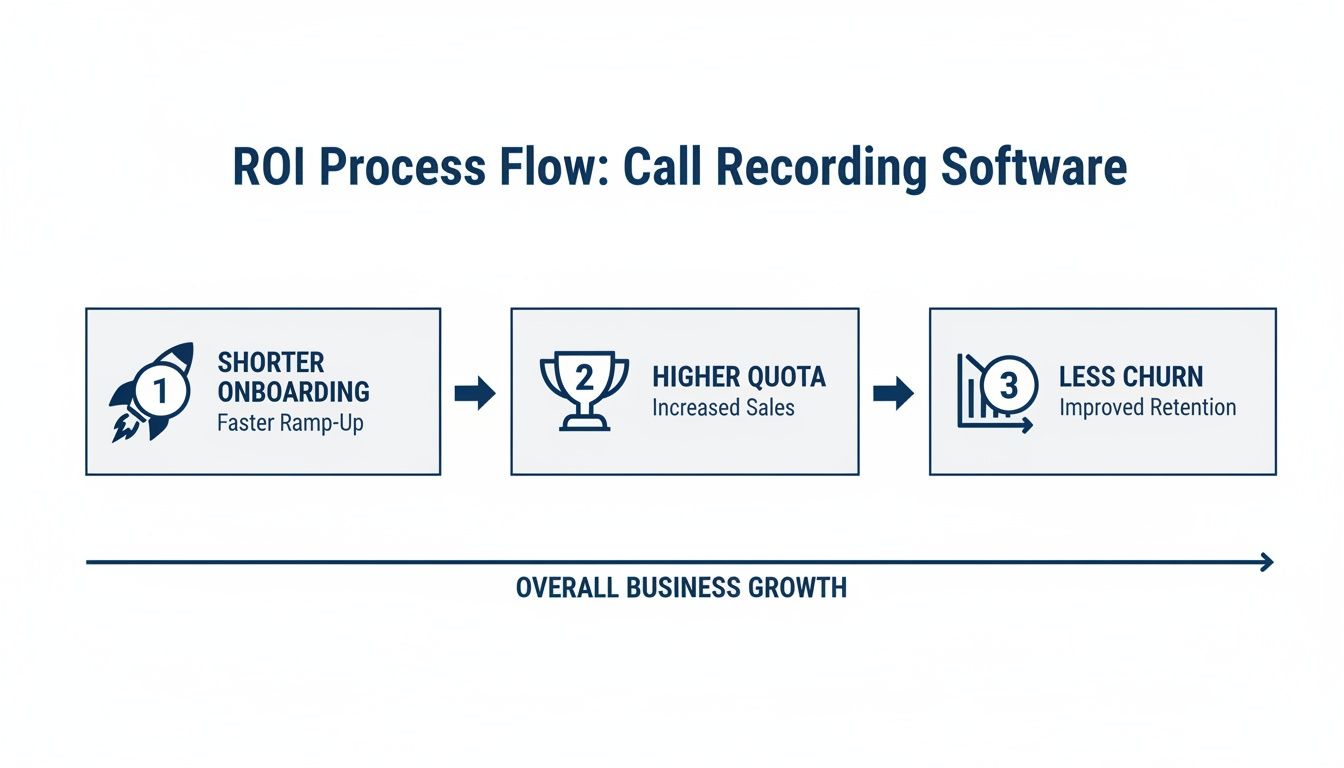
This flow isn't just a theory; it's a proven process. When you embed the software correctly, you get shorter onboarding, higher quota attainment, and better team retention. By focusing on immediate, tangible value and making it frictionless to use, you guarantee your investment in sales call recording software pays for itself over and over again.
Still Have Questions? Let's Clear Things Up
Diving into a new piece of tech always brings up a few last-minute questions, even when the benefits seem obvious. Getting clear, straightforward answers is what gives you the confidence to move forward. Let's tackle some of the most common ones we hear.
Is Recording Sales Calls Actually Legal?
This is usually the first question out of the gate, and for good reason. The short answer is: it depends on where you and your customer are located.
Call recording laws are all about "consent." Some places follow one-party consent, meaning you only need permission from one person on the call (which would be your sales rep). Simple enough.
But many other regions, including a handful of U.S. states and any country covered by GDPR, require two-party consent (or "all-party consent"). This means everyone on the line needs to know they're being recorded.
The smartest, simplest approach is to always act like you're in a two-party consent zone. Kick off every call with an automated, friendly heads-up like, "Just so you know, this call is being recorded for quality and training purposes." It keeps you compliant everywhere and, more importantly, builds trust right from the start.
Will My Sales Team Feel Like They're Being Spied On?
That's a real and valid concern. The entire success of bringing this software on board comes down to how you frame it. If your team thinks it’s a "gotcha" tool, they'll push back.
The secret is to position it as what it truly is: a powerful coaching and performance tool built to help them win more deals.
Show them how it makes their lives easier, not harder:
Less Admin, More Selling: Think automated notes, instant summaries, and CRM fields that fill themselves out. That’s hours of busywork they get back every week.
The Greatest Hits Playlist: They can finally learn from the best moments of the top performers on the team, seeing exactly what works.
On-Demand Self-Coaching: Reps can review their own calls to spot their own mistakes and wins, sharpening their skills without waiting for a manager.
When your team sees it as a tool that helps them hit their number and grow professionally, you won't just get adoption—you'll get enthusiasm.
How Technical Do I Need to Be to Use This?
Honestly? Not at all. Modern sales call recording software is built for people who sell, not for IT wizards. The best platforms are designed to be incredibly intuitive and almost invisible.
Most systems plug right into the tools you already use, like your Google or Outlook calendar and your meeting platform (Zoom, Google Meet, you name it). After a quick, one-time setup, the software just runs in the background. Finding a recording, skimming an AI summary, or checking on action items is as easy as using any other app on your phone—no technical degree required.
How Does This Software Really Help with Sales Coaching?
It completely changes the game. Coaching goes from a subjective, time-consuming chore to a data-driven, scalable strategy. Managers can't sit in on every call—it's just not possible. This is the next best thing. Actually, it's better.
With a library of every call at their fingertips, managers can:
Find the Game-Changing Moments: They can jump directly to the part of a call where a deal turned a corner—for better or for worse.
Share What Winning Sounds Like: Create playlists of perfect discovery calls or brilliant objection handling to train the whole team.
Track Real Skill Improvement: They can actually measure how a rep gets better at a specific skill over time, like delivering the value prop.
It’s coaching that is hyper-specific, backed by evidence, and helps every single rep master the tactics that actually close deals.
Ready to see how a bot-free, AI-powered notetaker can turn your sales conversations into revenue? GLINKY gives you native speaker recognition, automated follow-ups, and perfect CRM integration so your team can stay present and perform at its peak. Explore GLINKY today.
People also read

10 Sales Enablement Best Practices to Unify Your Revenue Engine in 2026
Productivity
Mar 13, 2026

How to Manage Sales Pipeline for Predictable Revenue Growth
Productivity
Mar 14, 2026

How to Qualify Leads in Sales Without Wasting Time
Productivity
Mar 17, 2026

What is Conversation Intelligence? A Practical Guide for Sales Teams
Productivity
Mar 18, 2026

Top 10 Sales Discovery Questions That Close More Deals
Productivity
Mar 25, 2026

Taking Minutes of Meeting: A Guide to Transforming Chaos into Action
Productivity
Feb 16, 2026

Action Items List: A Practical Guide to Drive Real Results
Productivity
Feb 19, 2026

Master the summary of a meeting for clear decisions and follow-ups
Productivity
Feb 22, 2026

Track Action Items: A Practical Guide to Using AI for Flawless Follow-Up
Productivity
Feb 17, 2026

Unlock: How to Take Notes on a Computer for Peak Productivity in 2026
Productivity
Feb 26, 2026

How to Record Google Meet: A Complete Guide for 2026
Productivity
Mar 4, 2026

12 Best AI Note Taking App Choices for 2026: The Definitive Guide
Productivity
Mar 6, 2026

How to Improve Customer Retention: Practical Tips to Boost Loyalty
Productivity
Mar 8, 2026

10 Client Communication Best Practices to Master in 2026
Productivity
Mar 7, 2026

The 12 Best AI Meeting Assistant Tools for 2026: A Deep Dive
Productivity
Mar 15, 2026

Your Guide to the Ultimate AI Email Writer
Productivity
Feb 27, 2026

10 Essential Customer Success Best Practices for 2026
Productivity
Mar 1, 2026

How to Take Better Meeting Notes and Drive Real Results
Productivity
Mar 5, 2026

Top 10 Picks for best crm for small business
Productivity
Mar 3, 2026

What is an Ideal Customer Profile: A Guide to Driving Growth
Productivity
Mar 9, 2026

Automated meeting minutes: Turn talks into actionable notes
Productivity
Mar 11, 2026

The Top 12 AI Powered Sales Tools to Boost Revenue in 2026
Productivity
Mar 16, 2026

AI Note Taking For Meetings: Fast, Smart AI Notes That Drive Collaboration
Productivity
Mar 19, 2026

Understanding Transcription Service Cost: A 2026 Guide
Productivity
Mar 20, 2026

Master Your Meetings With The Note Taking Charting Method
Productivity
Feb 18, 2026

The Ultimate 2026 Guide: 8 Meeting Follow Up Email Template Scenarios
Productivity
Feb 20, 2026

Master the Art of Taking Meeting Notes for Actionable Outcomes
Productivity
Feb 25, 2026

12 Best Sales Lead Generation Tools to Boost Your Pipeline in 2026
Productivity
Mar 10, 2026

Translation Vs Transcription: Which Service Do You Really Need?
Productivity
Mar 12, 2026

Mastering the goals of a meeting to drive decisions and boost team alignment
Productivity
Mar 23, 2026

The 12 Best Free AI Email Writer Tools for 2026
Productivity
Mar 22, 2026

A Guide to AI Sales Enablement Platforms in 2026
Productivity
Mar 21, 2026

Automate Follow Up Emails: Actionable Insights for Boosting Sales & Efficiency
Productivity
Mar 26, 2026

Follow Up Email Subjects That Convert: Increase Opens and Replies
Productivity
Feb 17, 2026

Your Playbook for Outbound Lead Generation in 2026
Productivity
Feb 28, 2026

Your Essential Meeting Action Items Template to Drive Results
Productivity
Feb 23, 2026

Your Guide to Using an Email Writer AI for Maximum Impact
Productivity
Feb 23, 2026

8 Essential Ground Rules at Meetings to Maximize Productivity in 2026
Productivity
Mar 24, 2026

Otter.ai vs Glinky
Productivity
Feb 5, 2026

AI Tools for Startup Founders [2026]
Productivity
Feb 4, 2026

Best AI Tools for Startups [2026]
Tools
Feb 3, 2026

Sales Call Notes: How to Capture Every Detail Without Losing the Deal
How to
Feb 2, 2026

How to Take Meeting Notes: 7 Methods That Actually Work [2026]
How to
Jan 14, 2026
![AI Meeting Minutes | Free Forever [2026]](https://framerusercontent.com/images/zYQGRjgLX63tiouLTK65LvCcjK8.png?width=402&height=263)
AI Meeting Minutes | Free Forever [2026]
How to
Jan 13, 2026
![How to Record Zoom Meetings Without a Bot [2026] 3 Easy Methods](https://framerusercontent.com/images/gGoQV8bPb9zR5weVruinbjaxO0.png?width=402&height=263)
How to Record Zoom Meetings Without a Bot [2026]
How to
Jan 9, 2026

Bot-Free AI Meeting Notes: We Tested the 6 Best Tools in 2026
Tools
Jan 8, 2026

Glinky vs Fireflies.ai
Tools
Jan 7, 2026

15 Best AI Tools to Boost Your Productivity in 2026
Productivity
Jan 6, 2026