Nov 13, 2025
Productivity
AI Note Taking For Meetings: Fast, Smart AI Notes That Drive Collaboration

So, what exactly is AI note taking for meetings?
Think of it as your team's dedicated scribe—one with a perfect memory. This technology automatically listens to your meetings, transcribes everything that's said, identifies who said what, and then distills the entire conversation into a neat summary with clear action items. It turns messy, unstructured audio into organized, usable intelligence.
The End of Forgettable Meetings
We’ve all been there. You walk out of a fantastic meeting buzzing with great ideas and clear commitments, only to have the crucial details fade by the next day. Trying to capture everything with manual notes feels like trying to catch smoke—you grab a few wisps, but most of it vanishes. For any business, but especially for lean, fast-moving teams, this isn't just frustrating. It's a real threat to your projects and revenue.
One of the biggest wins with this tech is how AI-powered meeting summaries completely change the post-meeting workflow. Instead of wasting time trying to remember what was decided, your team gets a clear, actionable recap almost instantly.
From Lost Details to Actionable Intelligence
For years, we relied on a designated note-taker in meetings. But even the most diligent person can't capture every nuance, especially while trying to participate in the conversation. This flawed process is why studies have shown that a staggering 40% of action items get dropped or forgotten. It’s what leads to that dreaded follow-up meeting just to clarify what happened in the first meeting.
Today's AI note-taking tools have flipped that script entirely. The best platforms now deliver transcription accuracy of up to 99%, putting them on par with professional human transcriptionists and miles ahead of the industry average. If you want to dive deeper into the data, you can read the full research on AI note-taking capabilities to see how these benchmarks were achieved. This level of precision means every word is captured faithfully.
Instead of a fragmented, incomplete record, you get a searchable, structured database of every customer call and internal strategy session. It’s the difference between a blurry photo and a high-definition video.
More Than Just Notes—It's a Revenue Engine
For growing companies, the impact is about much more than just convenience. Teams that adopt a modern AI note taker often save 10-15 hours per week for each rep. That’s time they can pour back into what really matters: engaging customers and closing deals.
The benefits are concrete and measurable:
Prevent Missed Opportunities: Every customer request, objection, and buying signal gets captured and can be automatically logged in your CRM. Nothing falls through the cracks.
Keep Projects Aligned: Action items are clearly identified and assigned, killing ambiguity and creating accountability across the board.
Accelerate Sales Cycles: When sales reps can focus 100% on the conversation instead of typing, they build stronger relationships and uncover deeper needs. This has been shown to boost close rates by as much as 22%.
This guide will walk you through how ai note taking for meetings evolves from a simple recording tool into a core part of your business operations. We'll cover how to choose the right solution, implement it, and use it to build a more streamlined and profitable workflow.
How AI Meeting Assistants Actually Work
So, what actually happens when you use an AI note-taker for your meetings? It’s not just a fancy tape recorder. Think of it as a team of specialists working behind the scenes, turning a messy, free-flowing conversation into something structured, searchable, and incredibly useful.
Let's pull back the curtain and look at the four key jobs the AI performs to make this happen. Each step builds on the last, transforming raw audio into pure business intelligence.
This is what the typical meeting workflow looks like without AI. It’s a chaotic process most of us know all too well.
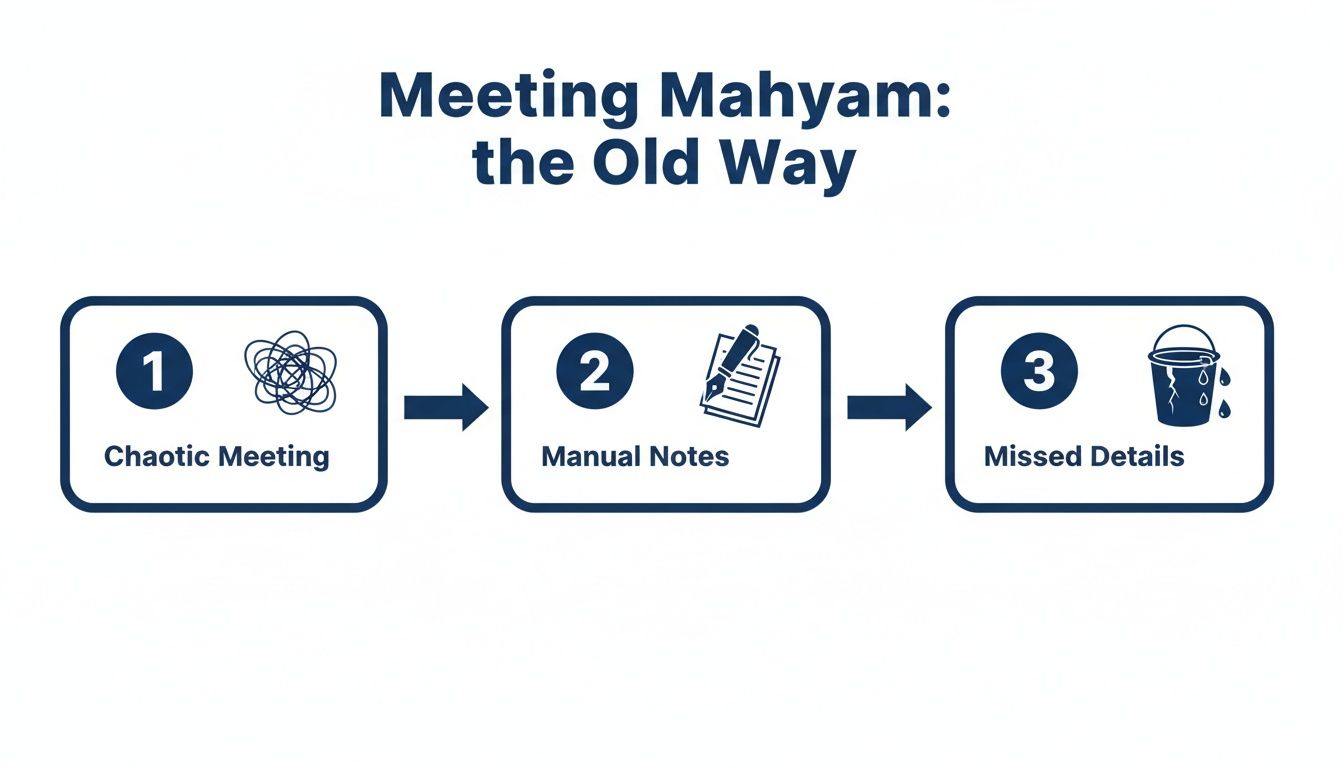
As you can see, the chaos of a busy call often leads to sloppy manual notes and lost details. It's a leaky bucket that costs businesses real time and money. AI note-takers are built to plug those leaks for good.
Step 1: The Stenographer — Capturing Every Word
First up is the "Stenographer." This is the core transcription engine, powered by Natural Language Processing (NLP). Its only job is to turn the meeting's audio into a written transcript. Picture a court reporter typing at 200 words per minute, catching every single thing that’s said.
This is the foundation. Modern speech-to-text models listen to the sounds and convert them into text. The accuracy here is everything. A high-quality transcript is the raw material, and if it's flawed, all the powerful analysis that follows will be built on shaky ground.
Step 2: The Detective — Figuring Out Who Said What
Once every word is captured, the "Detective" gets to work. This part of the system uses a clever technology called speaker diarization to figure out who said what. It analyzes the unique acoustic properties of each person's voice—like pitch, pace, and tone—and assigns every line of dialogue to the right person.
The result is a clean, easy-to-read script of your meeting. No more guessing who agreed to handle a task or who raised that critical objection. The conversation becomes as clear as a screenplay, with each speaker's name attached to their words.
Step 3: The Analyst — Finding the Key Insights
With a perfect, speaker-labeled transcript in hand, the "Analyst" steps in. This is where AI summarization models, the same kind of tech behind tools like ChatGPT, start to shine. The Analyst reads the entire conversation to pinpoint the most important information.
It’s like having an executive assistant who sat through the whole meeting for you and then handed you a one-page summary. The AI pulls out the core topics, key decisions, and any questions left unanswered.
This summary saves you from ever having to listen to a full recording again. It gives you the high-level brief you need to get up to speed in minutes, not hours. For a deeper dive into the mechanics and integrations, you can learn more about how Glinky's AI platform works.
Step 4: The Project Manager — Extracting Action Items
Finally, the "Project Manager" takes the baton. This component uses action item extraction to scan the transcript and summary for any mention of a task or commitment. It’s trained to spot phrases like, "I'll get that over to you by EOD," or "Let's make sure Sarah sends out the proposal."
It then pulls out these commitments and organizes them into a clean to-do list. The best tools can even suggest an owner and a deadline for each task. This is the step that turns talk into action, ensuring that every promise made in a meeting is captured, assigned, and tracked, driving real momentum for your business.
Evaluating The Best AI Note Taker Features
The market for ai note taking for meetings is flooded. Every tool promises to save you time, but not all features are created equal. It's easy to get lost in marketing hype, but the real key is to cut through the noise and pinpoint the capabilities that solve your actual business problems.
Think of it this way: you wouldn't buy a family minivan to compete in a Formula 1 race. You need the right machine for the job. Similarly, your choice of AI note taker has to match your team’s specific mission—whether that’s simply capturing notes or driving your entire revenue engine.
Core Features No Business Should Compromise On
Before you even glance at the fancy add-ons, there are a few non-negotiable, foundational features. These are the absolute table stakes. If a tool can't get these right, none of its other bells and whistles will matter.
Your evaluation checklist needs to start here:
High-Accuracy Transcription: The entire system is built on this. If the transcription is sloppy, everything else falls apart. You should be looking for tools that consistently deliver over 95% accuracy. Anything less just creates more cleanup work, completely defeating the purpose.
Reliable Speaker Identification: Knowing what was said is useless if you don't know who said it. Solid speaker recognition (diarization) is critical for context and accountability. You need to know who committed to what.
Automated Summaries and Chapters: Nobody wants to read a 30-page transcript. A good tool must be able to distill a 60-minute meeting into a scannable summary with clear highlights and decisions. Automatic chapters act like a table of contents, letting you jump straight to the important parts.
Action Item Detection: A great AI note taker doesn't just record the past; it helps you build the future. It should automatically spot commitments, tasks, and next steps discussed on the call, instantly turning conversations into an actionable checklist.
The ultimate test is brutally simple: Does this tool give me a trustworthy record of my meeting that I can act on right now, without having to re-listen or double-check everything? If the answer is no, move on.
Advanced Features for Revenue-Focused Teams
Once you’ve nailed down the essentials, it's time to look at the features that separate a basic recording tool from a true revenue intelligence platform. This is where you find the capabilities that help you analyze conversations, coach your team, and actually accelerate growth.
For any startup or SME focused on sales, customer success, or just growing the business, these are the game-changers.
To help you prioritize, here’s a breakdown of the essential features you need from day one versus the more advanced capabilities that will give you a serious competitive edge.
Essential Vs Advanced AI Note Taker Features
Feature | What It Does | Why It Matters For Startups And SMEs |
|---|---|---|
Seamless CRM Integration | Automatically syncs meeting notes, contacts, and action items with your CRM like HubSpot or Salesforce. | This is a massive time-saver. It kills manual data entry and ensures your CRM is a reliable source of truth with the latest customer intelligence, not a graveyard of outdated info. |
Talk-to-Listen Ratio | Analyzes the speaking time of each participant, showing if your reps are monologuing or actively listening to the customer. | A killer coaching metric. It gives you a clear, data-backed way to train reps to ask better questions and let the prospect do the talking—which is how you win deals. |
Multi-Language Support | Accurately transcribes and summarizes meetings held in various languages. | If you have a global team or sell to an international customer base, this isn't a luxury; it's a necessity. It breaks down communication silos and keeps everyone aligned, regardless of language. |
Sentiment Analysis | Detects the emotional tone of a conversation, flagging moments of customer excitement, frustration, or confusion. | It’s your early warning system. This helps you instantly spot at-risk deals or identify a customer who is primed for an upsell, letting you act before it's too late. |
Ultimately, choosing the right platform means aligning these features with your business goals. A sales team will live and die by its talk-time analytics and CRM sync. A product team might obsess over keyword tracking to spot customer feedback.
Start by ensuring the core essentials are rock-solid, then identify the advanced features that will give you the biggest impact. This is how you pick a tool that doesn’t just take notes—it actively helps you build your business.
The Bot Versus Bot-Free Integration Debate
When you're choosing an AI notetaker for your meetings, one decision trumps almost all others: how does it actually join the call? This boils down to a fundamental choice between using a meeting "bot" and a "bot-free" integration. It might sound like a minor technical detail, but the difference has a massive impact on client perception, security, and the overall feel of your meetings.
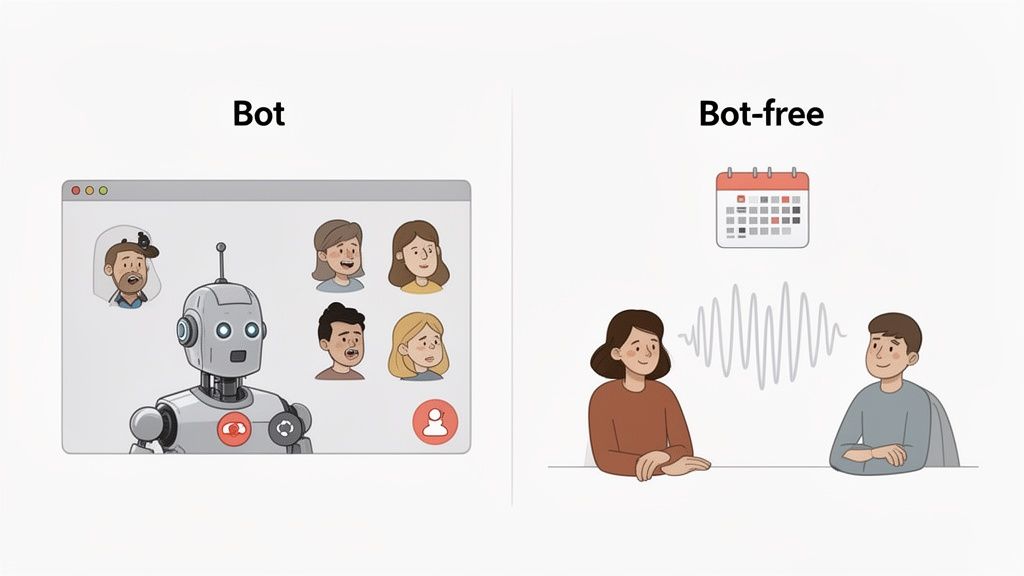
This isn't just about technology; it’s about the entire dynamic of your professional conversations. Getting this wrong can kill rapport before you even say hello.
What Is a Meeting Bot?
We’ve all seen them. Meeting bots, used by tools like Fireflies.ai or Otter.ai, work by sending an automated participant into your video call. You suddenly see "Otter.ai Notetaker" pop up in the participant list, like an uninvited guest.
While it gets the job done for recording audio, this approach immediately creates friction. The presence of a digital stranger is jarring for clients, raising instant questions about privacy and making the conversation feel transactional from the get-go.
The Superiority of Bot-Free Integration
A bot-free solution, like Glinky, takes a completely different, far more professional route. Instead of injecting a clunky bot into the call, it integrates directly with your calendar and the backend of video platforms like Zoom or Google Meet. It captures the audio stream without ever showing up as a participant.
The core advantage is invisibility. The technology works silently in the background, allowing the human-to-human connection to remain the focus of the meeting. This builds trust rather than creating suspicion.
This approach delivers some serious benefits:
No Intrusive Guests: Your clients only see the people they expect to see. This keeps the conversation natural and preserves the rapport you've worked to build.
Bypasses Security Blocks: Many companies have strict IT policies that automatically block unknown bots from joining calls. A bot-free tool doesn’t have this problem because it never "joins" in the first place.
Enhanced Professionalism: It shows you’re using advanced tools without disrupting the client experience. It's a polished, modern approach that reflects well on your brand.
The market for AI meeting note-taking is exploding, projected to hit $5.2 billion by 2026. This growth is overwhelmingly driven by companies looking for unified, professional platforms that don't get in the way. For teams aiming to save costs, a bot-free tool like Glinky can offer an all-in-one solution for notes and CRM sync, potentially saving a 10-person team an estimated $50,000 per year in separate tool costs.
For any team that is serious about building trust and making sure every meeting starts on the right foot, the bot-free approach is the only way to go. To see how these tools stack up, check out our deep dive where we tested the 6 best bot-free AI meeting notes tools in 2026. It's a head-to-head comparison of the top solutions out there.
Real-World Use Cases That Drive Revenue
Features and tech specs are just the starting point. The real value of AI note taking for meetings isn't about the technology itself—it’s about what it unlocks for your team.
This is where the rubber meets the road. It's about solving the painful, day-to-day problems that cost you time and money. Let's look at how specific roles use these tools to turn conversations into tangible business results.
Sales Leaders Cloning Their Top Performers
Every sales leader has that one rep who just crushes it. They navigate objections with ease, tell incredible stories, and have a sixth sense for when to push a deal forward. What if you could bottle that magic and distribute it to your entire team?
That's exactly what AI meeting intelligence allows you to do. By analyzing the call transcripts and talk-time analytics of your top performer, you can build a library of what actually works.
Objection Handling Playbooks: Pinpoint the exact language your best reps use to diffuse pricing concerns or neutralize competitors. You can turn these moments directly into training materials.
Pitch Analysis: Compare the talk-to-listen ratios of your A-players against everyone else. The data almost always proves the best reps listen far more than they talk—a powerful, data-backed lesson for the whole sales floor.
This isn't about micromanaging. It's about data-driven coaching. You can finally identify winning behaviors and create a scalable system to develop talent, effectively cloning the skills of your best sellers across the organization.
Account Executives Nailing Every Follow-Up
For an Account Executive, the difference between a closed-won deal and a stalled one often comes down to a single detail missed during a discovery call. A budget constraint, a competitor mention, a key decision-maker's personal pain point—forgetting just one can kill momentum.
An AI note taker acts as an AE's perfect memory. After a packed discovery call, they get an instant, searchable transcript and a tight summary highlighting every critical detail.
AEs no longer have to block off 30 minutes post-call to frantically type up notes and wrestle with the CRM. The AI handles it for them, freeing them up to craft a sharp, personalized follow-up email that hits on the exact pain points and commitments from the conversation.
This immediate, detailed follow-up doesn't just look professional; it proves to the prospect that they were heard. It keeps the deal moving and builds the trust you need to get to the finish line.
Founders and CEOs Getting a Pulse on the Market
Founders and C-suite leaders can't be in every meeting, but they desperately need a direct line to the voice of the customer. They need to understand market feedback, track competitor mentions, and gauge customer sentiment without living in back-to-back calls.
Using an AI note taking for meetings platform gives them a bird's-eye view of the entire business. They can search across thousands of meeting transcripts for keywords like a competitor’s name or a new feature request, spotting trends as they emerge.
This turns isolated customer conversations into a rich, searchable database of market intelligence. It empowers founders to make smarter, faster strategic decisions based on what customers are actually saying, not on filtered, secondhand reports.
Customer Success Managers Driving Renewals
For a Customer Success Manager, relationships are everything. Forgetting a key business goal or a past frustration mentioned in a QBR can seriously damage trust and put a renewal in jeopardy. Success depends on perfect recall.
An AI note taker ensures nothing falls through the cracks. Before a check-in, a CSM can instantly review the summaries from every past interaction, getting a complete picture of the client's journey.
Every conversation becomes more strategic, reinforcing the CSM's role as a true advisor. This detailed history is invaluable for demonstrating value, proactively heading off issues, and ultimately driving higher retention and spotting upsell opportunities.
Implementing AI Note Taking For Maximum ROI
A powerful tool is only as good as its rollout. Just buying a subscription to an AI note-taker and hoping for the best won't magically solve your meeting problems. To see a real return, you need a clear plan to weave it into your team's DNA.
This is how you turn a neat piece of tech into a core part of your business engine—one that delivers a measurable, undeniable impact on your bottom line. It all starts by making the tool a natural extension of the software your team already lives in every single day.
Integrate Your Core Software Stack
The first move is to connect your AI note-taker with your mission-critical platforms. This is what turns a simple note repository into an active intelligence hub that fuels your entire operation.
You’ll want to focus on these three key connections:
Your Calendar (Google or Outlook): This is the bedrock. Connecting your calendar lets the AI tool automatically know which meetings to capture. No manual scheduling, no forgotten invites. It just works.
Your CRM (HubSpot, Salesforce, etc.): For any revenue team, this is non-negotiable. When meeting summaries, customer quotes, and commitments are instantly synced to the right contact or deal, you eliminate hours of painful data entry. It’s the cure for the common "dead CRM."
Your Communication Tools (Slack): Imagine key decisions or action items from a call instantly appearing in the relevant project channel. Integrating with tools like Slack keeps the entire team aligned in real-time without anyone having to hunt for information.
Think of integration as building a central nervous system for your company's conversations. When your meeting intelligence platform can automatically update your CRM and ping your team on Slack, you’ve created a frictionless flow of information that saves time and prevents critical details from getting lost.
Run an Effective Team Onboarding
Once the tech is hooked up, it’s time to get your people on board. A rushed, generic rollout is a recipe for low adoption and wasted money. A proper onboarding is all about showing each person exactly what's in it for them.
Forget one-size-fits-all training. Show your sales reps how it completely automates their CRM updates after a demo. Show managers how they can use call data to coach their team more effectively. Context is everything. To truly get the most out of it, you need to frame it within the bigger picture of how to use AI for productivity and give people back their time.
Create Standardized Workflows
With an integrated tool and an engaged team, the final piece of the puzzle is standardization. This creates the consistency you need to reliably analyze conversation data across the board.
Start by developing specific meeting templates for different types of conversations. For example, a template for a discovery call might automatically tag for mentions of budget, timeline, and specific pain points. A template for a quarterly business review (QBR) could be set up to flag success metrics and renewal risks.
This is where the real long-term value gets unlocked. Once you have standardized data, you can start tracking the metrics that matter and build a rock-solid business case.
Time Saved on Administrative Tasks: Track the 10-15 hours a month your team gets back from automated note-taking and CRM entry.
Increased Follow-up Rates: Are reps sending faster, more detailed follow-ups now that they can easily track action items from meetings? Measure it.
Impact on Pipeline Velocity: Analyze whether deals are moving through stages faster now that reps are focused on selling, not scribbling notes.
When you integrate your tools, train your team with purpose, and standardize your workflows, the ROI from AI note taking for meetings becomes impossible to ignore.
Frequently Asked Questions About AI Note Taking
Jumping into any new tech brings up a few questions. It’s smart to get straight answers before you commit. When it comes to AI note taking for meetings, the big concerns usually circle back to security, accuracy, and just plain old etiquette. Let's tackle them one by one.
How Secure Is My Meeting Data?
This is the big one, and the answer is: it completely depends on the tool you pick.
Think of it this way: the best providers treat your data like a bank treats your money. They use end-to-end encryption (both when it's moving and when it's stored) so that nobody outside your team can get a peek at your conversations.
Beyond that, you need to check for compliance with major privacy laws.
GDPR/CCPA Compliance: These are the gold standards for data protection. A tool that meets these requirements gives you control over your data and proves it’s being handled the right way.
Data Processing Agreements (DPA): Any serious provider will have a clear DPA. It’s a contract that spells out exactly how they use, process, and store your data. No surprises.
A huge security advantage also comes from picking a bot-free solution. These tools skip the security headaches of having an unknown third-party participant join your call—something that many corporate firewalls are specifically set up to block.
How Accurate Is The Transcription Really?
Look, no AI is going to be 100% perfect. But the top tools are now consistently hitting 95% accuracy or higher when the audio is clear. That’s more than good enough to create a reliable, searchable record of your meeting.
But that accuracy really hinges on audio quality. To get the best results:
Use a decent microphone.
Try to keep background noise to a minimum.
Avoid having people talk over each other.
Remember, the goal isn't a flawless court transcript. It’s about creating a "good enough" record that captures key decisions, action items, and customer quotes with enough precision to be actionable.
Will My Clients Be Uncomfortable With Call Recording?
This all comes down to transparency. The trick is to frame the technology as a benefit for them, not as a surveillance tool. Most people are completely fine with recording if you just explain the "why" at the start.
Try saying something like this when the call kicks off:
"Just to let you know, I’m using an AI assistant to help me take notes for this meeting. It allows me to be 100% focused on our conversation instead of getting distracted by typing, and it ensures I don’t miss any important details or commitments we make today."
That simple statement turns a potential awkward moment into a positive. It shows you're committed to listening and being accountable. For a deeper dive, check out some expert takes on the etiquette of using AI assistants in meetings.
Ready to stop stitching tools together and unify your revenue workflow? Glinky is the AI-native revenue engine that combines meeting intelligence, lead discovery, and outreach sequencing in one platform. See how Glinky can transform your meetings and drive growth.
People also read

10 Sales Enablement Best Practices to Unify Your Revenue Engine in 2026
Productivity
Mar 13, 2026

How to Manage Sales Pipeline for Predictable Revenue Growth
Productivity
Mar 14, 2026

How to Qualify Leads in Sales Without Wasting Time
Productivity
Mar 17, 2026

What is Conversation Intelligence? A Practical Guide for Sales Teams
Productivity
Mar 18, 2026

Top 10 Sales Discovery Questions That Close More Deals
Productivity
Mar 25, 2026

Taking Minutes of Meeting: A Guide to Transforming Chaos into Action
Productivity
Feb 16, 2026

Action Items List: A Practical Guide to Drive Real Results
Productivity
Feb 19, 2026

Master the summary of a meeting for clear decisions and follow-ups
Productivity
Feb 22, 2026

Track Action Items: A Practical Guide to Using AI for Flawless Follow-Up
Productivity
Feb 17, 2026

Unlock: How to Take Notes on a Computer for Peak Productivity in 2026
Productivity
Feb 26, 2026

How to Record Google Meet: A Complete Guide for 2026
Productivity
Mar 4, 2026

12 Best AI Note Taking App Choices for 2026: The Definitive Guide
Productivity
Mar 6, 2026

How to Improve Customer Retention: Practical Tips to Boost Loyalty
Productivity
Mar 8, 2026

10 Client Communication Best Practices to Master in 2026
Productivity
Mar 7, 2026

The 12 Best AI Meeting Assistant Tools for 2026: A Deep Dive
Productivity
Mar 15, 2026

Your Guide to the Ultimate AI Email Writer
Productivity
Feb 27, 2026

10 Essential Customer Success Best Practices for 2026
Productivity
Mar 1, 2026

Your Guide to Sales Call Recording Software in 2026
Productivity
Mar 2, 2026

How to Take Better Meeting Notes and Drive Real Results
Productivity
Mar 5, 2026

Top 10 Picks for best crm for small business
Productivity
Mar 3, 2026

What is an Ideal Customer Profile: A Guide to Driving Growth
Productivity
Mar 9, 2026

Automated meeting minutes: Turn talks into actionable notes
Productivity
Mar 11, 2026

The Top 12 AI Powered Sales Tools to Boost Revenue in 2026
Productivity
Mar 16, 2026

Understanding Transcription Service Cost: A 2026 Guide
Productivity
Mar 20, 2026

Master Your Meetings With The Note Taking Charting Method
Productivity
Feb 18, 2026

The Ultimate 2026 Guide: 8 Meeting Follow Up Email Template Scenarios
Productivity
Feb 20, 2026

Master the Art of Taking Meeting Notes for Actionable Outcomes
Productivity
Feb 25, 2026

12 Best Sales Lead Generation Tools to Boost Your Pipeline in 2026
Productivity
Mar 10, 2026

Translation Vs Transcription: Which Service Do You Really Need?
Productivity
Mar 12, 2026

Mastering the goals of a meeting to drive decisions and boost team alignment
Productivity
Mar 23, 2026

The 12 Best Free AI Email Writer Tools for 2026
Productivity
Mar 22, 2026

A Guide to AI Sales Enablement Platforms in 2026
Productivity
Mar 21, 2026

Automate Follow Up Emails: Actionable Insights for Boosting Sales & Efficiency
Productivity
Mar 26, 2026

Follow Up Email Subjects That Convert: Increase Opens and Replies
Productivity
Feb 17, 2026

Your Playbook for Outbound Lead Generation in 2026
Productivity
Feb 28, 2026

Your Essential Meeting Action Items Template to Drive Results
Productivity
Feb 23, 2026

Your Guide to Using an Email Writer AI for Maximum Impact
Productivity
Feb 23, 2026

8 Essential Ground Rules at Meetings to Maximize Productivity in 2026
Productivity
Mar 24, 2026

Otter.ai vs Glinky
Productivity
Feb 5, 2026

AI Tools for Startup Founders [2026]
Productivity
Feb 4, 2026

Best AI Tools for Startups [2026]
Tools
Feb 3, 2026

Sales Call Notes: How to Capture Every Detail Without Losing the Deal
How to
Feb 2, 2026

How to Take Meeting Notes: 7 Methods That Actually Work [2026]
How to
Jan 14, 2026
![AI Meeting Minutes | Free Forever [2026]](https://framerusercontent.com/images/zYQGRjgLX63tiouLTK65LvCcjK8.png?width=402&height=263)
AI Meeting Minutes | Free Forever [2026]
How to
Jan 13, 2026
![How to Record Zoom Meetings Without a Bot [2026] 3 Easy Methods](https://framerusercontent.com/images/gGoQV8bPb9zR5weVruinbjaxO0.png?width=402&height=263)
How to Record Zoom Meetings Without a Bot [2026]
How to
Jan 9, 2026

Bot-Free AI Meeting Notes: We Tested the 6 Best Tools in 2026
Tools
Jan 8, 2026

Glinky vs Fireflies.ai
Tools
Jan 7, 2026

15 Best AI Tools to Boost Your Productivity in 2026
Productivity
Jan 6, 2026