
Nov 13, 2025
Productivity
Track Action Items: A Practical Guide to Using AI for Flawless Follow-Up

We've all been there. You hang up from a fantastic client call, feeling the momentum, only to have a critical follow-up item disappear into the ether. That sinking feeling when you realize a promised demo was never scheduled or a key piece of information was never sent is a pain every professional knows too well.
This isn't just a minor slip-up. It's a direct hit to your bottom line.
The Hidden Costs of Forgotten Follow-Ups
Those missed opportunities are the hidden costs of messy action item management. They are the silent revenue killers that slowly chip away at client trust and bring progress to a grinding halt.
When a follow-up gets dropped, a potential deal can go cold. A client's small problem can balloon into a major issue. Your reputation for being reliable and on top of things takes a serious knock. The hard truth is that the old ways of tracking tasks just can’t keep up with how fast business moves today.
Why Sticky Notes and Email Chains Fail
For years, we’ve cobbled together systems to keep track of our promises. We've relied on Post-it notes stuck to monitors, scribbles in notebook margins, and endless, confusing email chains. While that might work for a few simple to-dos, it completely falls apart under the weight of multiple projects, clients, and conversations.
The problem with these manual systems always boils down to a few key things:
Everything is scattered. Your action items are all over the place—one is in an email, another in a Slack message, and a third is on a personal to-do list. This makes it impossible to get a clear picture of what actually needs to get done.
There’s zero accountability. Without a clear owner and a deadline logged in a central, visible place, tasks just float around. This leads to the classic, "Oh, I thought you were handling that" moment.
Human error is guaranteed. Manually typing up notes from a meeting and turning them into tasks is a recipe for disaster. Important context gets lost, details are misremembered, and some action items are just forgotten completely in the transfer.
The fallout from this is massive. Without a solid tracking process, a staggering 25% of leads can fall through the cracks simply due to forgotten follow-ups. That's a huge loss of potential revenue that can be traced directly back to a broken process. You can find more insights on the evolution of marketing metrics at Bismart.
The Smart Shift: Proactive, Automated Systems
Fixing this isn't just about getting more organized. It’s about fundamentally changing your approach. Instead of reacting to missed deadlines and angry clients, top-performing teams are getting proactive with automated systems. The real game-changer? Artificial Intelligence.
AI-powered tools are closing the gap between conversation and action. They listen in on meetings, pinpoint commitments as they're made, and instantly turn them into structured, trackable tasks.
This shift completely removes the manual grunt work that causes so many follow-ups to get missed in the first place.
Imagine finishing a call and, moments later, seeing a perfectly summarized list of next steps already assigned to the right people, with the right due dates, and synced directly to your CRM or project management tool. This isn't science fiction anymore; it's a real advantage that's giving teams a serious edge. In fact, companies that have adopted AI notetakers are already reporting 30% faster deal cycles. That’s proof that turning talk into immediate, trackable action is one of the fastest ways to accelerate revenue.
Laying the Foundation for Your Action Item Tracking System
Alright, let's move from the why to the how. We know forgotten tasks are deal-killers, so how do we build a practical, bulletproof system to track action items? The good news is you don’t need some ridiculously complex piece of software. What you do need is a clear, repeatable process your entire team can actually follow.
This whole system really boils down to four key pillars that create a tight loop of accountability and, more importantly, execution. We're going to walk through each one: capturing tasks on the fly, assigning them with zero ambiguity, prioritizing what actually moves the needle, and finally, closing the loop to get things done. This isn't just theory—it's a hands-on approach any team can use to turn conversations into tangible results.
Think about it: the path from a great meeting to a lost deal often starts with one single, forgotten action item. This visual lays out that simple, but incredibly costly, journey of a missed follow-up.
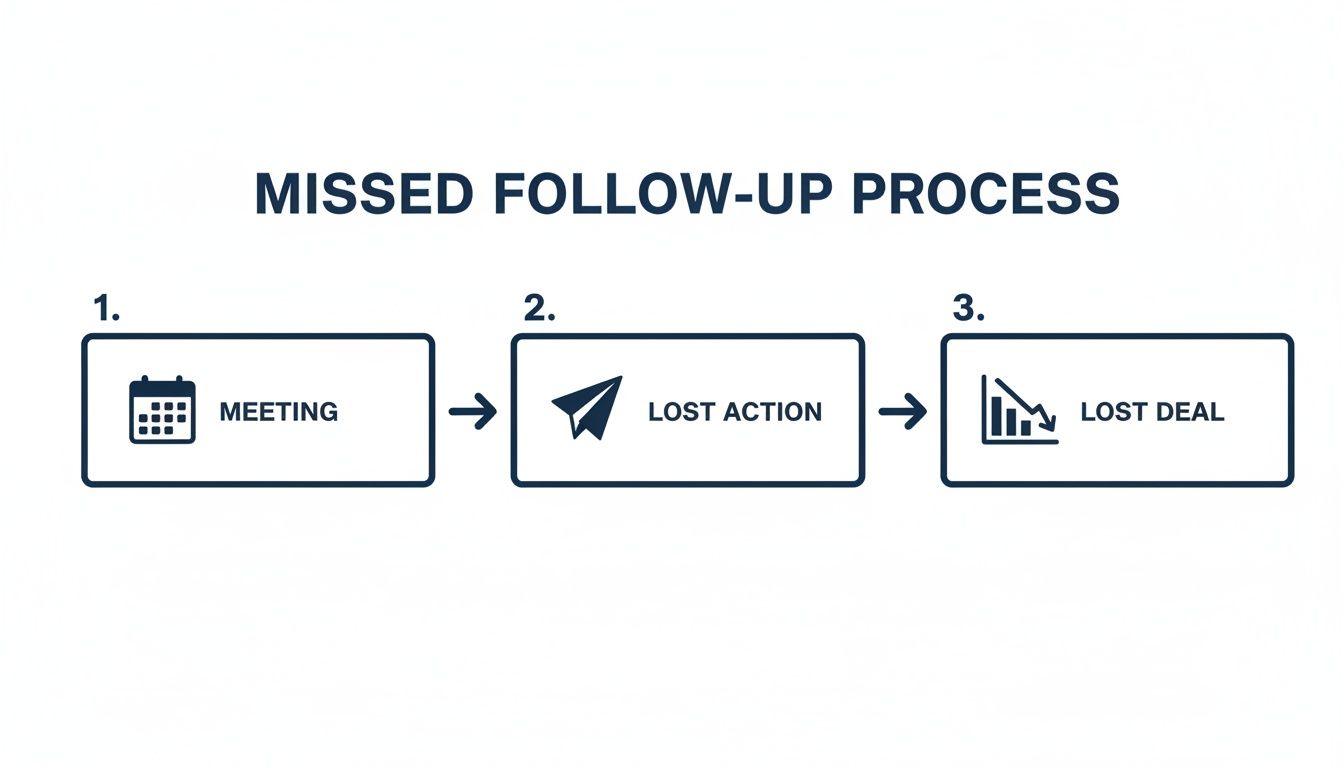
As you can see, the domino effect is swift. A productive meeting followed by a lost action item can directly lead to a lost opportunity. That's a hit to both your pipeline and the client's trust in you.
Capture Everything Without Killing the Vibe
First things first: you have to capture action items accurately. The real trick is doing this without completely derailing the conversation. Nothing kills the momentum of a great client call faster than saying, "Hang on, let me write that down." It breaks the flow and, frankly, can make you look a little disorganized.
The goal is to snag commitments as they happen. A lot of people try to develop their own shorthand during meetings, but let's be honest, that's a recipe for disaster. And manually transcribing notes after every call? It’s a massive time sink and you always risk losing the original context. If you're stuck in this cycle, our guide on how to take effective meeting notes has some solid strategies to break free.
The best capture systems are the ones you don't even notice. Tools that can listen in the background and automatically flag action items when they hear phrases like "I'll send," "we need to," or "the next step is" are a game-changer. They take the burden of note-taking off your shoulders, letting you stay 100% engaged in the conversation while making sure nothing falls through the cracks.
Assign with Unmistakable Clarity
Once a task is captured, it needs an owner, a deadline, and context. A vague action item like "Follow up with marketing" is basically an orphan—it's destined to be ignored. This is where most manual tracking systems completely fall apart.
An effective assignment has three non-negotiable parts:
A Single Owner: One task, one person. If more people are involved, pick a lead who is ultimately responsible for getting it over the finish line.
A Firm Deadline: Ditch vague timelines like "next week." Be specific: "by EOD Friday, Oct 25th." This creates a clear finish line and a sense of urgency.
Sufficient Context: Always link the action item back to the original conversation. Why does this task exist? What problem is it solving? Tying it to a meeting note or even a snippet of a transcript gives the owner the background they need.
Without a clear owner and due date, an action item is just a suggestion. True accountability begins the moment a task is assigned to a specific person with a specific deadline.
This level of detail completely eliminates the classic "I thought someone else was on that" excuse. Everyone knows exactly who's doing what, and by when.
Prioritize What Truly Matters
Let’s be real: not all action items are created equal. Some are five-alarm fires that could make or break a deal, while others are just simple follow-ups. Without a way to prioritize, your team could easily burn precious hours on low-impact work while the critical stuff gets ignored.
A few solid frameworks can help you prioritize your team's work. The key isn't which one you choose, but that you pick one and stick with it. Here's a quick look at a couple of popular methods that help teams figure out what to tackle first.
Action Item Prioritization Frameworks
Deciding what to work on next can feel chaotic. These frameworks bring structure to the madness, helping your team focus on what delivers the most value.
Framework | Best For | Key Principle | Example Use Case |
|---|---|---|---|
Eisenhower Matrix | Individuals and small teams with varied tasks | Separates tasks based on urgency and importance into four quadrants: Do, Decide, Delegate, Delete. | A sales rep uses it to distinguish between sending an urgent proposal (Do) and scheduling a routine internal meeting (Decide). |
MoSCoW Method | Product development and project-based teams | Categorizes requirements into Must-have, Should-have, Could-have, and Won't-have priorities. | A product team planning a software release uses MoSCoW to define core features (Must-have) versus nice-to-have additions (Could-have). |
Choosing a framework like this transforms a messy to-do list into a strategic roadmap. It ensures your team is consistently focused on the tasks that will actually drive significant results.
Close the Loop with Consistent Follow-Up
The final piece of the puzzle is the follow-up. A system to track action items is pretty useless if no one ever checks to see if they got done. This isn't about micromanaging; it's about creating a culture of accountability.
Set up simple, automated reminders for upcoming deadlines. A friendly nudge 24 hours before a task is due can be all it takes to keep things on track. Another powerful habit is to kick off every team meeting with a quick 5-minute review of open action items from the last one. It’s a simple routine that reinforces the importance of follow-through and makes it clear that commitments are taken seriously.
A Look at the Best Tools for Tracking Action Items
Choosing the right tool to track action items is a bigger deal than most people think. Get it right, and your team hums along. Get it wrong, and things fall through the cracks. The market is packed with options, but they really boil down to three categories, each with its own set of trade-offs when it comes to turning talk into action.
Let's break down the landscape so you can find what actually works for your team.
The Old Guard: Traditional Project Management Tools
You know the names: Asana, Monday.com, Trello. These platforms are the titans of structured work. They’re phenomenal for mapping out complex projects with clear start and end dates, assigning detailed tasks, and getting that bird's-eye view with Gantt charts or Kanban boards.
But here’s the catch. Their rigidity is both a feature and a bug. These systems are completely dependent on manual entry. That brilliant idea or critical next step that comes up in a fast-paced client call? It's not getting into Asana unless someone hits pause, breaks the flow of conversation, and meticulously types it all in. That friction means most of it never gets logged at all.
The Free-for-All: Flexible Note-Taking Apps
Then you have the other side of the coin with apps like Notion and Evernote. These are amazing digital canvases for organizing information, building a knowledge base, or just capturing thoughts. You can easily whip up checklists and simple to-do lists right inside your notes, giving you a freedom that the project management behemoths just can't offer.
The problem? They're terrible for accountability. You can make a checklist, sure, but these apps won't nudge the owner, flag a missed deadline, or push that task into your CRM where the real work gets done. The entire burden of chasing people down and connecting the dots is still on you. It's way too easy for action items to become forgotten relics buried in a sea of documents.
The real challenge isn't just making a list of action items. It's about capturing them accurately in the moment, assigning them clearly, and plugging them into the workflow where things actually get done. Both traditional PM tools and simple notetakers drop the ball on this crucial handoff.
The New Wave: AI-Powered Automation
This is where a new breed of AI-driven tools is completely changing the game. They’re built to solve the one problem the other guys ignore: how do you pull action items out of a live conversation without killing the momentum? This isn't science fiction anymore; it’s here now.
The push toward automation is undeniable. Gartner recently predicted that by 2027, a whopping 60% of repetitive data management tasks will be automated. Think about that. The soul-crushing work of logging action items and chasing follow-ups—which can eat up to 40% of a manager's week—is finally on the chopping block.
If you’re looking at your options, it's worth checking out the top AI powered project management tools that are using intelligence to manage tasks. They represent a massive leap forward.
This screenshot gives you a perfect example. A tool like Glinky can listen to a long, winding conversation and instantly distill it into a clean summary with clearly defined action items. You don't have to re-listen to a recording or try to make sense of your scribbled notes. The AI does the heavy lifting, pinpointing commitments and suggesting who owns them.
What Makes Glinky Different
Even within this new AI category, Glinky has a unique approach. It’s designed to automate the entire lifecycle of an action item, from the moment it’s spoken to the moment it's completed. It doesn’t just transcribe your calls; it actually understands them.
Glinky is a bot-free AI notetaker that quietly listens to your conversations and automatically flags key decisions, commitments, and next steps. Once the call is over, you don't just get a wall of text. You get a structured summary and a pre-populated list of action items, all ready for you to confirm.
Here’s where it really stands out:
Zero-Effort Capture: Glinky grabs action items as they happen in real-time. No more frantic typing or asking people to repeat themselves.
Smart Assignment: It uses context from the conversation to suggest who should own a task and when it should be due, cutting down on the admin work.
One-Click Integration: This is the magic. You can push these action items directly into your CRM (like Salesforce or HubSpot) or your project management tool. The tasks go where your team actually works. Want to see how it stacks up? Check out our review of the best bot-free AI meeting note tools.
Automated Follow-Up: Glinky can draft the follow-up email for you, complete with a summary and the list of assigned action items, so you can close the loop with everyone instantly.
While the old tools force you to manually build a bridge between your conversations and your to-do lists, Glinky is the bridge. It transforms talk into trackable, actionable tasks, making sure the energy from a great meeting actually turns into real progress.
Automating Your Workflow with AI and Glinky
Let's be honest: manual systems for tracking action items are a house of cards. They depend entirely on someone remembering to jot things down, copy them over to another app, assign them out, and then—the hardest part—actually chase people for updates. The moment one person drops the ball, a deal stalls or a client relationship sours. This is where AI automation steps in, not just to speed things up, but to make the entire process foolproof.
Imagine finishing a critical client call and just… moving on. No frantic scribbling, no 30 minutes spent deciphering your own handwriting to type up a summary. Behind the scenes, Glinky has already transcribed the entire call, pulled out the key decisions, and identified every single action item that was agreed upon.
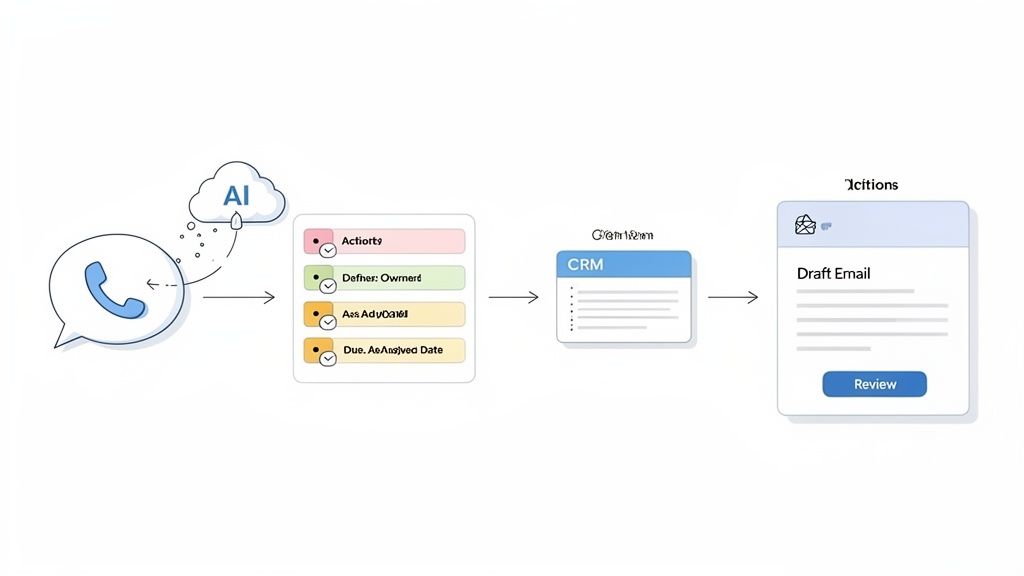
This isn’t just about clawing back time. It’s about ensuring nothing gets lost in translation between the conversation and the to-do list.
From Spoken Words to Structured Tasks
A solid workflow starts with clean capture. Glinky sits silently on your calls, listening for commitment language—phrases like "I'll follow up with..." or "The next step is to..."—and flags them as action items.
But it doesn't just give you a raw list. Glinky uses the context of who said what to intelligently suggest owners and even propose due dates. It turns a messy, free-flowing conversation into a structured plan of attack.
The most powerful automation doesn't just do tasks faster; it completes the entire follow-up cycle for you. It connects your conversations directly to your systems of record, ensuring nothing is ever lost in translation.
After the call, you’re presented with a clean list of proposed action items. This is where the human-in-the-loop design is critical. You get the final say. With a single click, you can approve the AI’s suggestions, make a quick edit, or add a detail that was missed. This blend of AI speed and human oversight guarantees total accuracy before anything moves downstream. You can explore the details of Glinky's automated process to see it in action.
Closing the Loop with Your CRM and Email
Once you’ve signed off on the action items, the real magic happens. Glinky doesn’t just create a list; it pushes the work into the tools your team already uses.
For a Sales Executive: You just got a verbal commitment on pricing. With one click, Glinky sends the action item "Send formal proposal by EOD Friday" straight to your CRM, creating a task linked to the right opportunity. At the same time, it drafts a follow-up email to the prospect summarizing the conversation and confirming that next step.
For a Customer Success Manager: A client flags a bug, and you promise a fix. Glinky captures this, creates a task like "Investigate API error for Client XYZ," and pushes it to your project management tool, assigned to the right engineer. The follow-up email it drafts confirms the issue is logged and tells the client what to expect.
With 70% of teams now working in a hybrid model, this kind of automated, real-time handoff is essential. And in an era where 144 countries have data privacy laws, using a bot-free tool like Glinky ensures you can track everything securely without an unwanted guest in your meetings.
Beyond Glinky: Other Tools for Your AI Toolkit
While Glinky is built to own the entire follow-up cycle—from conversation to CRM—other AI tools can help you manage the time needed to get the work done.
Motion: This tool acts like a personal assistant for your calendar, using AI to schedule tasks from your to-do list into the open slots in your day. It’s fantastic for optimizing individual productivity.
Clockwise: Geared toward team schedules, Clockwise intelligently shuffles meetings to open up longer blocks of uninterrupted "focus time" for everyone. It helps protect the time you need to actually complete your action items.
Timely: Using AI, Timely automatically tracks how much time you spend on different apps and projects. This gives you a crystal-clear picture of where your day is going so you can better estimate future work.
These tools are great for managing your time. Glinky’s unique contribution is generating the action items in the first place, capturing them directly from your conversations, and wiring them into your core business systems.
For a deeper look into how AI is changing the game for productivity, check out this comprehensive guide to AI time tracking.
Advanced Strategies for Team Accountability
Look, having a system to capture and assign tasks is table stakes. That’s just the beginning. If you want to actually drive results, you need a culture of accountability—a place where follow-through is the default, not a pleasant surprise. This is about moving beyond just logging tasks and building a framework that ensures your team executes on their commitments, every single time.
A system to track action items is only as good as the accountability behind it. This has always been the weak link for most teams. Before 2020, we were all stuck with scattered email chains and clunky spreadsheets, which led to a pretty dismal 23% completion rate for action items in global enterprises. You can discover more insights about evolving data trends that impact businesses.
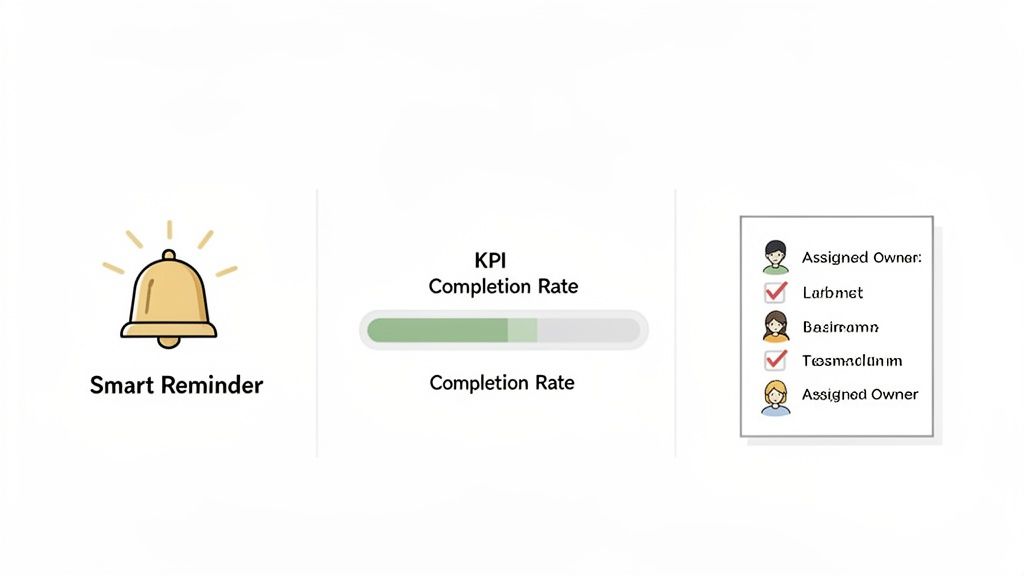
This is where we go from theory to practice. Let’s get into the advanced techniques you need to build that culture and close the loop on every task.
Define and Measure Your Accountability KPIs
You can't fix what you don't measure. Fluffy goals like "let's get better at follow-ups" are completely useless. You need to define and track specific Key Performance Indicators (KPIs) that give you a real, unfiltered look at your team's execution.
Here are a few core metrics to start with:
Action Item Completion Rate: This is your north star. What percentage of action items are actually completed by their due date each week or month?
Time to Completion: How long, on average, does it take for a task to get closed out after it’s assigned? This is fantastic for spotting hidden bottlenecks in your workflow.
Overdue Item Percentage: Keep a sharp eye on the percentage of tasks that blow past their deadline. If this number starts creeping up, it’s an early warning that your system is starting to fray.
Tracking these KPIs turns accountability from a vague concept into a hard number you can manage and improve.
Establish Smart Communication Cadences
Accountability lives and dies by clear, consistent communication. Constantly nagging your team for updates just breeds resentment, but total silence lets things fall through the cracks. The sweet spot is a smart, non-intrusive rhythm for getting progress updates.
A simple, powerful habit is to start every team meeting with a quick, five-minute review of open action items from the previous call. This single practice reinforces that commitments are taken seriously and creates a natural forum for accountability without feeling like micromanagement.
Another great technique is using automated, context-aware reminders. Instead of a generic "Hey, what's the status on that thing?" find a tool that can link a reminder directly back to the original meeting summary and conversation. This gives the task owner the full picture, making it far easier for them to jump back in and take action.
Implement a "Review and Close" Ritual
Finally, you have to make "closing the loop" a formal, non-negotiable part of your process. As soon as an action item is marked complete, the original stakeholders—especially if it’s a client—need to be notified. This is how you build trust and prove your team is reliable.
Create simple templates for these follow-ups. For instance, a quick email that says, "Just confirming that we've completed [Action Item], as discussed in our call on [Date]. The outcome was [Result]." This does more than just confirm completion; it documents the value you delivered, reinforcing a culture where every promise made is a promise kept.
Got Questions About Action Items? We've Got Answers.
Even with the slickest system, questions are going to pop up. Getting your team to actually use an action item tracker consistently is all about clearing the roadblocks before they even appear. Let's dig into the common hurdles I see teams face all the time.
How Do We Track Action Items When We’re All Remote?
For distributed teams, a central, cloud-based tool isn't just a nice-to-have; it's the only way. I’ve seen teams try to juggle spreadsheets and scattered notes across different time zones, and it always ends in chaos. They simply can't keep up in real-time.
This is exactly where a tool like Glinky shines. It’s built for the way we work now. By automatically pulling action items from video calls and pushing them into a shared space or your CRM, everyone gets instant clarity on who owns what and when it's due. No more excuses about not seeing the latest update.
How Can I Get My Team to Actually Use This Thing?
Look, people are busy. If you roll out a system that feels like more administrative work, they'll find a way around it. Adoption comes down to two things: making it ridiculously easy and showing them the value.
The secret is to find a tool that removes friction, not adds it. An AI system that automates the boring stuff—like capturing and assigning tasks—is a game-changer because it gives people time back instead of asking for more of it.
You also have to lead from the front. Use the system religiously in your meetings. Reference it in your follow-ups. Call out wins that happened because an action item was tracked properly. Once the team sees it helps them focus on what really matters, they’ll get on board.
What About Action Items from Quick, Informal Chats?
This is the classic blind spot. A notetaker is great for scheduled meetings, but what about that quick hallway conversation or a spontaneous brainstorm on Slack? You need a dead-simple way to get those informal tasks into the same system.
The best solution is a tool that isn't picky about how it gets information. Some platforms, for instance, let you forward an email or use a mobile app to fire off a quick note. That note then gets intelligently parsed and dropped right into your main action item list. This kind of flexibility is key to making sure nothing falls through the cracks, no matter where the conversation happened.
Stop losing deals to forgotten follow-ups. GLINKY transforms your conversations into actionable, trackable tasks that sync directly to your CRM. Try it free today and see the difference.
People also read

10 Sales Enablement Best Practices to Unify Your Revenue Engine in 2026
Productivity
Mar 13, 2026

How to Manage Sales Pipeline for Predictable Revenue Growth
Productivity
Mar 14, 2026

How to Qualify Leads in Sales Without Wasting Time
Productivity
Mar 17, 2026

What is Conversation Intelligence? A Practical Guide for Sales Teams
Productivity
Mar 18, 2026

Top 10 Sales Discovery Questions That Close More Deals
Productivity
Mar 25, 2026

Taking Minutes of Meeting: A Guide to Transforming Chaos into Action
Productivity
Feb 16, 2026

Action Items List: A Practical Guide to Drive Real Results
Productivity
Feb 19, 2026

Master the summary of a meeting for clear decisions and follow-ups
Productivity
Feb 22, 2026

Unlock: How to Take Notes on a Computer for Peak Productivity in 2026
Productivity
Feb 26, 2026

How to Record Google Meet: A Complete Guide for 2026
Productivity
Mar 4, 2026

12 Best AI Note Taking App Choices for 2026: The Definitive Guide
Productivity
Mar 6, 2026

How to Improve Customer Retention: Practical Tips to Boost Loyalty
Productivity
Mar 8, 2026

10 Client Communication Best Practices to Master in 2026
Productivity
Mar 7, 2026

The 12 Best AI Meeting Assistant Tools for 2026: A Deep Dive
Productivity
Mar 15, 2026

Your Guide to the Ultimate AI Email Writer
Productivity
Feb 27, 2026

10 Essential Customer Success Best Practices for 2026
Productivity
Mar 1, 2026

Your Guide to Sales Call Recording Software in 2026
Productivity
Mar 2, 2026

How to Take Better Meeting Notes and Drive Real Results
Productivity
Mar 5, 2026

Top 10 Picks for best crm for small business
Productivity
Mar 3, 2026

What is an Ideal Customer Profile: A Guide to Driving Growth
Productivity
Mar 9, 2026

Automated meeting minutes: Turn talks into actionable notes
Productivity
Mar 11, 2026

The Top 12 AI Powered Sales Tools to Boost Revenue in 2026
Productivity
Mar 16, 2026

AI Note Taking For Meetings: Fast, Smart AI Notes That Drive Collaboration
Productivity
Mar 19, 2026

Understanding Transcription Service Cost: A 2026 Guide
Productivity
Mar 20, 2026

Master Your Meetings With The Note Taking Charting Method
Productivity
Feb 18, 2026

The Ultimate 2026 Guide: 8 Meeting Follow Up Email Template Scenarios
Productivity
Feb 20, 2026

Master the Art of Taking Meeting Notes for Actionable Outcomes
Productivity
Feb 25, 2026

12 Best Sales Lead Generation Tools to Boost Your Pipeline in 2026
Productivity
Mar 10, 2026

Translation Vs Transcription: Which Service Do You Really Need?
Productivity
Mar 12, 2026

Mastering the goals of a meeting to drive decisions and boost team alignment
Productivity
Mar 23, 2026

The 12 Best Free AI Email Writer Tools for 2026
Productivity
Mar 22, 2026

A Guide to AI Sales Enablement Platforms in 2026
Productivity
Mar 21, 2026

Automate Follow Up Emails: Actionable Insights for Boosting Sales & Efficiency
Productivity
Mar 26, 2026

Follow Up Email Subjects That Convert: Increase Opens and Replies
Productivity
Feb 17, 2026

Your Playbook for Outbound Lead Generation in 2026
Productivity
Feb 28, 2026

Your Essential Meeting Action Items Template to Drive Results
Productivity
Feb 23, 2026

Your Guide to Using an Email Writer AI for Maximum Impact
Productivity
Feb 23, 2026

8 Essential Ground Rules at Meetings to Maximize Productivity in 2026
Productivity
Mar 24, 2026

Otter.ai vs Glinky
Productivity
Feb 5, 2026

AI Tools for Startup Founders [2026]
Productivity
Feb 4, 2026

Best AI Tools for Startups [2026]
Tools
Feb 3, 2026

Sales Call Notes: How to Capture Every Detail Without Losing the Deal
How to
Feb 2, 2026

How to Take Meeting Notes: 7 Methods That Actually Work [2026]
How to
Jan 14, 2026
![AI Meeting Minutes | Free Forever [2026]](https://framerusercontent.com/images/zYQGRjgLX63tiouLTK65LvCcjK8.png?width=402&height=263)
AI Meeting Minutes | Free Forever [2026]
How to
Jan 13, 2026
![How to Record Zoom Meetings Without a Bot [2026] 3 Easy Methods](https://framerusercontent.com/images/gGoQV8bPb9zR5weVruinbjaxO0.png?width=402&height=263)
How to Record Zoom Meetings Without a Bot [2026]
How to
Jan 9, 2026

Bot-Free AI Meeting Notes: We Tested the 6 Best Tools in 2026
Tools
Jan 8, 2026

Glinky vs Fireflies.ai
Tools
Jan 7, 2026

15 Best AI Tools to Boost Your Productivity in 2026
Productivity
Jan 6, 2026