Nov 13, 2025
Productivity
Your Guide to Using an Email Writer AI for Maximum Impact

An email writer AI is essentially a smart assistant that helps you draft, clean up, and personalize emails. You feed it some quick notes or details from a conversation, and it spits out a polished, ready-to-send draft. It's designed to help you write much faster, get past that dreaded writer's block, and craft messages that actually get results.
Why an AI Email Writer Is Your New Secret Weapon

We’ve all been there. You just wrapped up a marathon meeting, your brain feels like mush, and now you have to stare at a blank screen and somehow cobble together a coherent follow-up email. You're trying to recall scattered notes, figure out who owns which action item, and nail the right tone. It feels like a chore that's almost as draining as the meeting itself.
This is exactly where an email writer AI goes from being a cool tech toy to an absolutely essential part of your daily workflow.
Think of it as a powerful co-pilot, not a robotic replacement. It's there to amplify your own efforts and, most importantly, give you back a huge chunk of your day.
Transform Chaos into Actionable Follow-Ups
Picture this: you hang up from a big client call where you made key decisions and agreed on a path forward. Instead of spending the next 20 minutes manually typing up a summary, an AI can digest your meeting notes and instantly produce a personalized draft.
But this isn't just about cranking out emails faster. It’s about accuracy and making sure nothing falls through the cracks. A genuinely good AI tool can:
Summarize key decisions in a way that's clear and easy to scan.
Pinpoint and assign action items to the right stakeholders.
Propose a natural, professional tone that aligns with the context of your conversation.
This simple automation lifts the burden of administrative busywork, freeing you up to focus on the high-value parts of your job—like building relationships and actually driving projects to the finish line.
By handling the initial draft, an AI email writer allows you to move from thinking about what to write to refining what’s already written. This small shift makes a massive difference in daily productivity.
To give you a clearer picture, here’s a quick rundown of how using an AI email writer stacks up against the old-school manual approach.
AI vs Manual Email Drafting Quick Comparison
Metric | Manual Email Drafting | AI-Powered Email Drafting |
|---|---|---|
Time to Draft | 10-20 minutes per complex email | 1-2 minutes for a high-quality first draft |
Accuracy | Dependent on memory and notes; prone to error | High; pulls directly from source data (notes/transcripts) |
Consistency | Tone and format can vary widely | Maintains a consistent brand voice and structure |
Personalization | Time-consuming; often generic to save time | Deeply personalized using specific context and details |
Productivity | A bottleneck; slows down follow-up cycles | An accelerator; enables immediate, actionable follow-ups |
As you can see, the benefits go far beyond just speed. The real win is in the quality and strategic impact on your communications.
Keeping Pace in a Crowded Inbox
The explosive demand for these tools really isn't a surprise. The AI email writer market has ballooned into a $2 billion industry, and it's projected to grow at a blistering 25% compound annual growth rate. This isn't just hype; it reflects a fundamental shift in how we work. With nearly 400 billion emails flooding our inboxes every single day, AI isn't a luxury—it's a lifeline for anyone trying to communicate effectively. If you're curious, you can explore the full research on this market surge to see the data for yourself.
At the end of the day, using an email writer AI is all about working smarter, not just harder. It’s about making sure every important conversation is followed by a clear, professional, and actionable email—helping you stay on top of your commitments without getting buried by your keyboard.
Crafting Prompts That Get Results
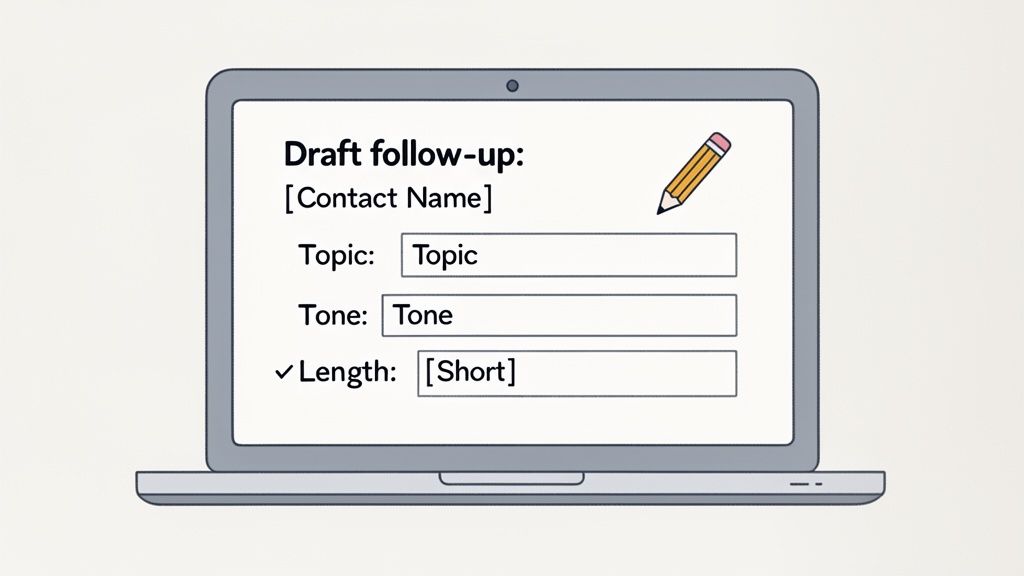
Here's a hard truth: getting great output from an email writer AI is all on you. Give it vague instructions, and you'll get a bland, generic email back. But feed it a well-structured prompt, and you can get a draft that feels personal and nails all the right points.
The secret is to stop thinking in simple commands and start using prompt formulas. Think of it like giving directions. "Get me to the city" is pretty useless. "Give me the fastest route to 123 Main Street, avoiding tolls" is going to get you exactly where you need to go. Same principle. The more context you provide—who you're writing to, your goal, the tone, key details—the better the AI's first draft will be.
This skill is becoming non-negotiable. With a staggering 82% of businesses now using AI for content and 71% of marketing teams leaning on it for tasks like drafting emails, knowing how to write a good prompt is a core competency. You can discover more about these AI writing statistics and see just how baked-in these tools are becoming.
The Anatomy of an Effective Email Prompt
A solid prompt is basically a blueprint for your email. Don't just give the AI a topic; give it a clear, actionable checklist of the message's building blocks.
Here are the four things you should always include:
Recipient and Context: Who is this for, and what's your history? Mention their name and the last time you connected (e.g., "after our demo call," or "following up from the networking event").
Goal: What's the one thing you want them to do? It could be anything from booking a meeting to confirming a decision. Be specific.
Key Information: What details absolutely must be in the email? List out any decisions, action items, or specific data points.
Tone and Length: How should it sound? Use descriptive words like "friendly and professional" or "brief and direct." You can also guide the length, asking for something "concise" or "under 150 words."
By consistently providing these four elements, you turn the AI from a simple text generator into a strategic communication partner. It’s the difference between a rough sketch and a detailed architectural plan.
From Theory to Practice: Real-World Scenarios
Let's put this into action with a common scenario. Say you just wrapped up a call with a potential client named Sarah. A weak prompt would be something lazy like: "Write a follow-up email to Sarah."
That’s not going to get you very far. Instead, try this:
"Draft a concise follow-up email to Sarah Jones after our call about the Q3 marketing campaign. Summarize our decision to focus on video content, confirm my action item to send over pricing by Friday, and suggest a brief follow-up meeting next week to review the proposal. Keep the tone professional but friendly."
See the difference? This detailed prompt gives the email writer AI everything it needs to create a focused, actionable message that sounds like you.
Some of the more advanced tools, like GLINKY, even build these prompts for you implicitly from structured meeting notes, which saves you from typing them out every time. Sticking to these Prompt Best Practices is what will unlock the real power of your AI email writer and get you the results you're after.
Automating Follow-Up Sequences That Convert
Sending one perfect email is a good start, but let's be real: deals are won in the follow-up. A single message, no matter how brilliant, can easily get buried. The data doesn't lie—it takes an average of 8 touchpoints to even get a meeting on the calendar. This is where an email writer AI becomes more than just a convenience; it's a strategic partner in persistence.
The art of the follow-up isn't about spamming someone's inbox. It's about staying top-of-mind by delivering value with each interaction. An effective sequence never just says "checking in." Instead, it changes the angle, offers something new, and keeps the conversation moving forward.
Designing a Smart Multi-Touch Cadence
Think of a great follow-up sequence as a conversation spread out over a few weeks. With a good AI assistant, you can map this out in minutes, generating smart, context-aware variations for each stage of the journey.
Here’s a simple but effective 3-step sequence I’ve seen work wonders for warm leads after an initial meeting:
Email 1 (Day 1): The Immediate Summary. Right after your call ends, the AI drafts a concise email recapping the key decisions and action items. This simple step confirms you were paying attention and establishes clear next steps. It’s professional and incredibly effective.
Email 2 (Day 4): The Value-Add. No reply yet? Don't panic. The next email should offer something genuinely useful. Ask your AI to draft a short message that shares a relevant article, a compelling case study, or a bit of industry news that connects directly to what you discussed.
Email 3 (Day 8): The Gentle Nudge. The final touchpoint is often the simplest. This is your friendly, low-pressure check-in. The AI can whip up a quick note asking if they’ve had a chance to review the information or if their priorities have shifted. It’s polite and keeps the door open.
This tiered approach respects their time while proving your commitment and expertise. Every email is a fresh opportunity to connect, not just another nagging reminder.
The most effective follow-up sequences are not repetitive; they are progressive. Each email builds on the last, shifting from logistical summary to genuine value, increasing your chances of getting a response without being annoying.
From Draft to Done with Full Automation
The real magic happens when your tools talk to each other. Modern platforms like GLINKY are designed to do more than just write emails; they connect the dots, turning your follow-up plan from a manual chore into a seamless, automated workflow.
Imagine this: your meeting ends, and the system instantly gets to work.
It triggers the sequence you designed, firing off that first summary email automatically.
It syncs follow-up tasks straight to your calendar, so you know exactly when the next touchpoint is due.
It logs all email activity right in your CRM, attaching every message to the correct contact record.
This is how you ensure opportunities don't slip through the cracks just because you got swamped or forgot to update your notes. If you're looking to really nail this, it helps to perfect your initial outreach. You can find some fantastic inspiration by studying a strong meeting follow-up email template, which you can then adapt and automate for your sequences.
By blending the smart drafting of an email writer AI with intelligent automation, you build a reliable system that nurtures leads, deepens relationships, and ultimately, closes more deals with far less manual effort.
Putting Your AI Email Writer to Work
An email writer AI is only as good as how well it fits into your day-to-day grind. Its real value isn't found in another app you have to open and manage. The magic happens when it disappears into the background, making the tools you already use faster and smarter. The goal is to remove steps, not add them.
Think about the chaos that often follows a productive meeting. The best setups turn that post-call scramble into a smooth, automated process. It should all kick off the second a meeting is recorded. From there, the AI should be able to generate clean notes and instantly draft a follow-up email that’s actually relevant, pulling from the conversation's context, decisions, and action items.
This is what that modern, efficient flow looks like in practice:
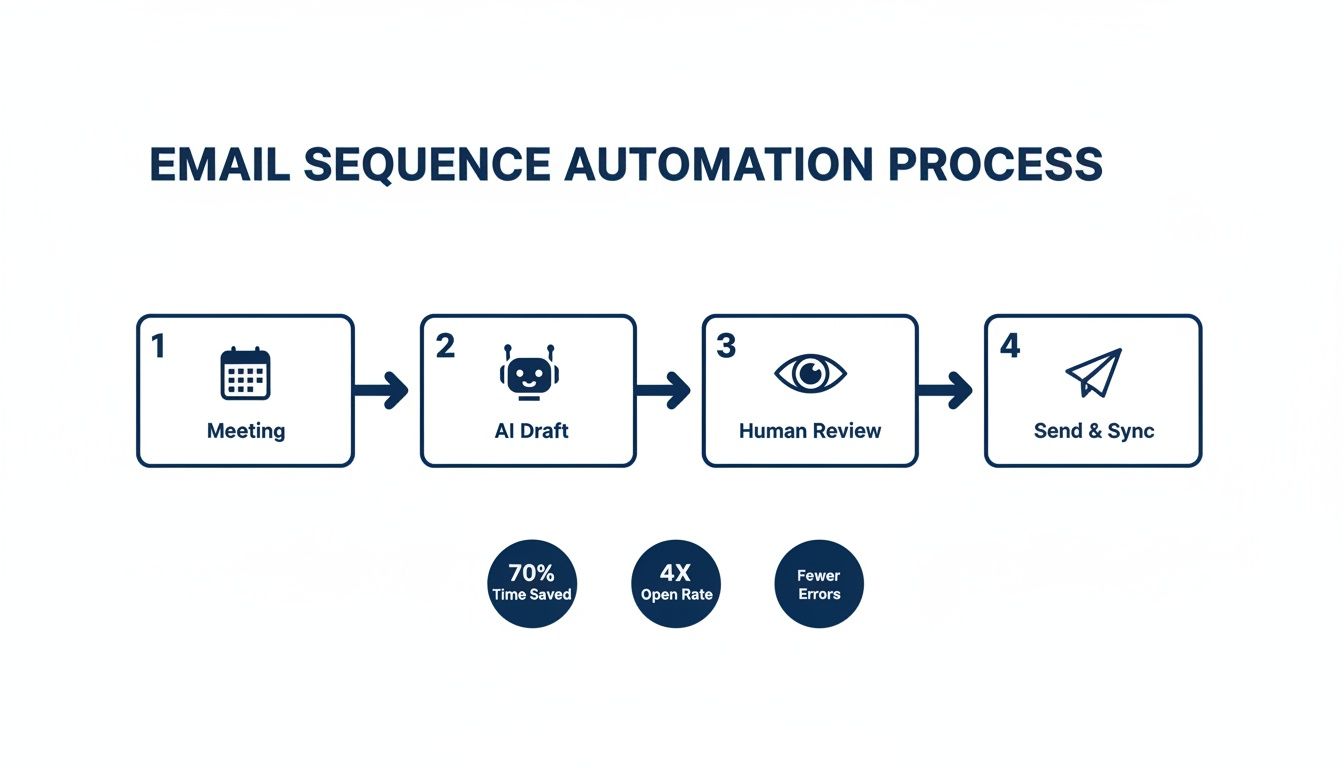
As you can see, the process moves logically from the meeting itself, to an AI-generated draft, through that all-important human review, and finally to sending the email and syncing everything back to your CRM.
The Human-in-the-Loop Advantage
That "human review" step is the most important part of the entire workflow. While AI can knock out 90% of the drafting work in just a few seconds, that final 10% is your moment. It’s where you add the personal touch that builds real relationships. This human-in-the-loop system is the secret to balancing speed with genuine connection.
Your review isn’t about rewriting the email from scratch. It’s a quick sanity check to:
Make sure the tone feels like you, not a robot.
Toss in a specific personal detail or inside joke that only a human would remember.
Confirm the AI didn't miss any key details or action items.
Think of the AI as your junior assistant. It gets you a solid, comprehensive draft, and you, as the strategist, give it the final polish and approval. It’s all about getting speed without ever sacrificing quality.
Bringing Your Tools Together on a Single Timeline
So, you've tweaked the draft and it's perfect. What's next? In a truly connected system, the final step is a single click. Hitting "send" should do two things at once: fire off the email and log the entire interaction in your CRM. This creates a unified timeline for every contact, where meeting notes, emails, and follow-up tasks all live together.
This simple change has some powerful benefits:
A Complete History: Anyone on your team can get the full story on a contact without having to piece it together from three different apps.
Seamless Handoffs: When an account moves to a colleague, the entire context is right there, fully documented.
No More Mind-Numbing Data Entry: All your activity is logged automatically, freeing you from tedious admin work.
The table below breaks down exactly how to weave an AI email writer into your standard workflow, turning a series of manual tasks into a single, fluid motion.
Workflow Integration Steps
Step | Action | Key Benefit |
|---|---|---|
1. Capture | Record your meeting or call. The AI works invisibly in the background. | No need for manual note-taking; you can stay fully present in the conversation. |
2. Draft | The AI automatically generates a summary and a contextual follow-up email draft. | Saves 10-15 minutes of writing time per meeting. The first draft is done for you. |
3. Review & Polish | You quickly review the draft, add a personal touch, and confirm accuracy. | Balances automation with authenticity, ensuring the final email sounds like you. |
4. Send & Sync | Send the email. The activity is automatically logged in your CRM with the notes. | Creates a single source of truth for all contact interactions, eliminating data entry. |
5. Follow-Up | The AI can automatically create tasks in your calendar or CRM for the next steps. | Ensures no action items fall through the cracks and keeps momentum going. |
By following this process, the AI becomes a natural extension of your sales or support function rather than just another tool to manage.
To really see this in action, check out how GLINKY builds this unified workflow on our How It Works page. And if you want to think even bigger, it’s worth seeing how you can build a complete AI-powered marketing team by connecting different no-code tools.
Beyond Drafting: Finding the Right Contacts with AI
An amazing email is completely worthless if it lands in the wrong inbox—or worse, bounces right back at you.
You know this. The most effective outreach doesn't start with a brilliant opening line. It starts with finding the right person. This is where the idea of an email writer AI gets a lot bigger, combining the art of drafting with the crucial science of lead discovery.
Modern platforms are finally catching on and integrating this directly. Forget juggling a separate contact database, a sales intelligence tool, and your email client. You can now run the entire play from a single screen. It collapses a clunky, time-sucking task into a simple, conversational request.
Imagine this: you just walked out of a strategy meeting fired up about a new target market. In the old days, you’d send your sales team on a wild goose chase through LinkedIn and company websites. Now, you can just ask the AI.
From Idea to Prospect in Seconds
This is where the magic really happens. You can use plain English to find exactly who you need, turning a vague idea into a list of real people you can talk to.
Here’s a prompt I’ve used that works wonders:
"Find me VPs of Sales at manufacturing companies with 500+ employees located in the Midwest."
A smart AI doesn't just spit back a list of names. It parses that request and instantly surfaces prospects who fit your ideal customer profile, armed with the data you need to actually start a conversation.
The real game-changer isn't just getting a list of names. It's getting verified contact information. This single step eliminates the soul-crushing guesswork of email formats and cuts out bad data, which some studies show can have an error rate as high as 30%.
What to Look for in AI-Powered Contact Discovery
When an AI serves up a list of potential contacts, the quality of that data is everything. A powerful platform won't just give you a name and a prayer. It will give you a full profile so you can move from finding someone to personalizing your outreach with total confidence.
Here’s what you should expect:
Verified Business Emails: The system has to confirm the address is active and deliverable. This is non-negotiable for protecting your sender reputation.
Direct-Dial and Corporate Phone Numbers: More ways to connect means a better chance of actually connecting.
Up-to-Date LinkedIn Profiles: This is your shortcut to researching their background, recent posts, and mutual connections for that perfect, personalized touch.
This integrated approach means you can go from talking about a target persona in a meeting to holding a list of verified, high-value leads just minutes later. You can see how platforms like GLINKY build this into their DNA by checking out our guide on AI-powered lead generation.
By combining top-tier contact discovery with a powerful email writer AI, you build a seamless workflow that puts your entire sales cycle on hyperdrive.
Measuring the ROI of Your AI Email Strategy
So, how do you prove that an email writer AI is more than just a fancy new time-saver? Don't get me wrong—getting hours back in your week is a massive win. But to build a real business case and justify the investment, you have to connect the dots between AI-driven emails and the outcomes that actually move the needle.
It's not enough to say you're sending emails faster. The goal is to send better emails that drive tangible results. This means moving beyond simple productivity wins and tracking the core metrics that define genuine email success.
Key Metrics to Track
The first thing you need is a clear "before" picture. Before you go all-in with an AI tool, take a snapshot of your current performance across these four key areas. This data is your benchmark, the solid ground you'll use to measure every improvement.
Open Rates: This is your first and most important hurdle. An AI-crafted subject line can be the difference between being read and being archived.
Click-Through Rates (CTR): Are people actually engaging with what's inside your email? CTR tells you if the message itself is hitting the mark.
Reply Rates: For anyone in sales or outreach, this metric is gold. It’s a direct signal of interest and active engagement.
Conversions: This is the bottom line. Are your AI-assisted emails leading to booked demos, closed deals, or new sign-ups?
The improvements you can see here are far from trivial. Recent data on AI-powered email writing shows some impressive lifts: subject lines crafted by AI can boost open rates by up to 22%. The emails themselves achieve a 9.44% click-through rate, outpacing the 8.46% from human-written counterparts. Even more compelling? The kind of deep personalization that AI enables can increase revenue by a staggering 41%. If you want to dive deeper, you can explore more statistics on AI email creation and see the full picture.
Connecting AI to Business Outcomes
Once you've got your baseline, you can start drawing a straight line from AI features to financial returns. This is how you transform a productivity tool into a proven revenue driver in the eyes of any stakeholder.
Let's say your team collectively saves 20 hours a week using an email writer AI. The next step is to quantify that. Just multiply those saved hours by the average loaded cost of your team members. That number isn't just a vanity metric; it represents real, hard operational savings that can be funneled back into other high-impact work.
The true return on investment isn't just about the time you get back; it's about what you do with that time. When your team can focus on building relationships instead of typing, the ROI becomes exponential.
Ultimately, measuring the ROI of your AI strategy is about telling a story with data. By tracking the right KPIs and tying them directly to your business goals, you can paint a clear picture of how this technology isn't just another line item on an expense report—it's a powerful engine for growth.
Your Questions About AI Email Writers, Answered
Jumping into any new technology brings up questions. It's totally normal. Let's tackle a few of the big ones I hear all the time so you can feel confident putting an email writer AI to work.
Will an Email Writer AI Make My Outreach Sound Robotic?
Only if you let it. The best way to think about these tools is as an assistant, not a ghostwriter. They’re designed to give you an incredible first draft by looking at specific context, like your meeting notes or a detailed prompt you provide.
The magic really happens with the "human-in-the-loop" approach. Your job isn’t to write from scratch anymore. Instead, you spend a few seconds tweaking the tone, injecting a personal insight, or adding a detail only you would know. You get the speed of AI combined with the authenticity that closes deals.
How Does an AI Handle Complex Follow-Ups?
This is actually where advanced systems truly shine. Imagine you just finished a call. An AI notetaker that was listening in can identify who said what, what decisions were made, and what the action items are for everyone involved.
It then uses that perfectly structured data to draft a follow-up that's comprehensive and crystal clear, correctly assigning tasks and recapping the main outcomes.
Instead of you spending 20 minutes trying to decipher messy notes, the AI hands you an organized, accurate draft. This is a lifesaver for calls with multiple stakeholders where getting the next steps right is absolutely critical.
Is It a Pain to Integrate an AI Email Tool with My CRM?
Not at all. Modern tools are built from the ground up to fit right into your existing workflow. They’re designed to plug directly into Google and Outlook calendars, your email client, and the big CRMs like Salesforce and HubSpot.
The entire point is to make your data flow effortlessly. For instance, after a call, the AI-drafted email, the full meeting notes, and any new tasks can be pushed to the right contact in your CRM with a single click. This creates a perfect, always-updated history of every single interaction, without any manual data entry.
Ready to turn your conversations into perfectly crafted follow-ups and clear, actionable outcomes? See how GLINKY can automate your notes, drafts, and CRM updates, giving you more time to focus on what actually matters. Get started with GLINKY.
People also read

10 Sales Enablement Best Practices to Unify Your Revenue Engine in 2026
Productivity
Mar 13, 2026

How to Manage Sales Pipeline for Predictable Revenue Growth
Productivity
Mar 14, 2026

How to Qualify Leads in Sales Without Wasting Time
Productivity
Mar 17, 2026

What is Conversation Intelligence? A Practical Guide for Sales Teams
Productivity
Mar 18, 2026

Top 10 Sales Discovery Questions That Close More Deals
Productivity
Mar 25, 2026

Taking Minutes of Meeting: A Guide to Transforming Chaos into Action
Productivity
Feb 16, 2026

Action Items List: A Practical Guide to Drive Real Results
Productivity
Feb 19, 2026

Master the summary of a meeting for clear decisions and follow-ups
Productivity
Feb 22, 2026

Track Action Items: A Practical Guide to Using AI for Flawless Follow-Up
Productivity
Feb 17, 2026

Unlock: How to Take Notes on a Computer for Peak Productivity in 2026
Productivity
Feb 26, 2026

How to Record Google Meet: A Complete Guide for 2026
Productivity
Mar 4, 2026

12 Best AI Note Taking App Choices for 2026: The Definitive Guide
Productivity
Mar 6, 2026

How to Improve Customer Retention: Practical Tips to Boost Loyalty
Productivity
Mar 8, 2026

10 Client Communication Best Practices to Master in 2026
Productivity
Mar 7, 2026

The 12 Best AI Meeting Assistant Tools for 2026: A Deep Dive
Productivity
Mar 15, 2026

Your Guide to the Ultimate AI Email Writer
Productivity
Feb 27, 2026

10 Essential Customer Success Best Practices for 2026
Productivity
Mar 1, 2026

Your Guide to Sales Call Recording Software in 2026
Productivity
Mar 2, 2026

How to Take Better Meeting Notes and Drive Real Results
Productivity
Mar 5, 2026

Top 10 Picks for best crm for small business
Productivity
Mar 3, 2026

What is an Ideal Customer Profile: A Guide to Driving Growth
Productivity
Mar 9, 2026

Automated meeting minutes: Turn talks into actionable notes
Productivity
Mar 11, 2026

The Top 12 AI Powered Sales Tools to Boost Revenue in 2026
Productivity
Mar 16, 2026

AI Note Taking For Meetings: Fast, Smart AI Notes That Drive Collaboration
Productivity
Mar 19, 2026

Understanding Transcription Service Cost: A 2026 Guide
Productivity
Mar 20, 2026

Master Your Meetings With The Note Taking Charting Method
Productivity
Feb 18, 2026

The Ultimate 2026 Guide: 8 Meeting Follow Up Email Template Scenarios
Productivity
Feb 20, 2026

Master the Art of Taking Meeting Notes for Actionable Outcomes
Productivity
Feb 25, 2026

12 Best Sales Lead Generation Tools to Boost Your Pipeline in 2026
Productivity
Mar 10, 2026

Translation Vs Transcription: Which Service Do You Really Need?
Productivity
Mar 12, 2026

Mastering the goals of a meeting to drive decisions and boost team alignment
Productivity
Mar 23, 2026

The 12 Best Free AI Email Writer Tools for 2026
Productivity
Mar 22, 2026

A Guide to AI Sales Enablement Platforms in 2026
Productivity
Mar 21, 2026

Automate Follow Up Emails: Actionable Insights for Boosting Sales & Efficiency
Productivity
Mar 26, 2026

Follow Up Email Subjects That Convert: Increase Opens and Replies
Productivity
Feb 17, 2026

Your Playbook for Outbound Lead Generation in 2026
Productivity
Feb 28, 2026

Your Essential Meeting Action Items Template to Drive Results
Productivity
Feb 23, 2026

8 Essential Ground Rules at Meetings to Maximize Productivity in 2026
Productivity
Mar 24, 2026

Otter.ai vs Glinky
Productivity
Feb 5, 2026

AI Tools for Startup Founders [2026]
Productivity
Feb 4, 2026

Best AI Tools for Startups [2026]
Tools
Feb 3, 2026

Sales Call Notes: How to Capture Every Detail Without Losing the Deal
How to
Feb 2, 2026

How to Take Meeting Notes: 7 Methods That Actually Work [2026]
How to
Jan 14, 2026
![AI Meeting Minutes | Free Forever [2026]](https://framerusercontent.com/images/zYQGRjgLX63tiouLTK65LvCcjK8.png?width=402&height=263)
AI Meeting Minutes | Free Forever [2026]
How to
Jan 13, 2026
![How to Record Zoom Meetings Without a Bot [2026] 3 Easy Methods](https://framerusercontent.com/images/gGoQV8bPb9zR5weVruinbjaxO0.png?width=402&height=263)
How to Record Zoom Meetings Without a Bot [2026]
How to
Jan 9, 2026

Bot-Free AI Meeting Notes: We Tested the 6 Best Tools in 2026
Tools
Jan 8, 2026

Glinky vs Fireflies.ai
Tools
Jan 7, 2026

15 Best AI Tools to Boost Your Productivity in 2026
Productivity
Jan 6, 2026